
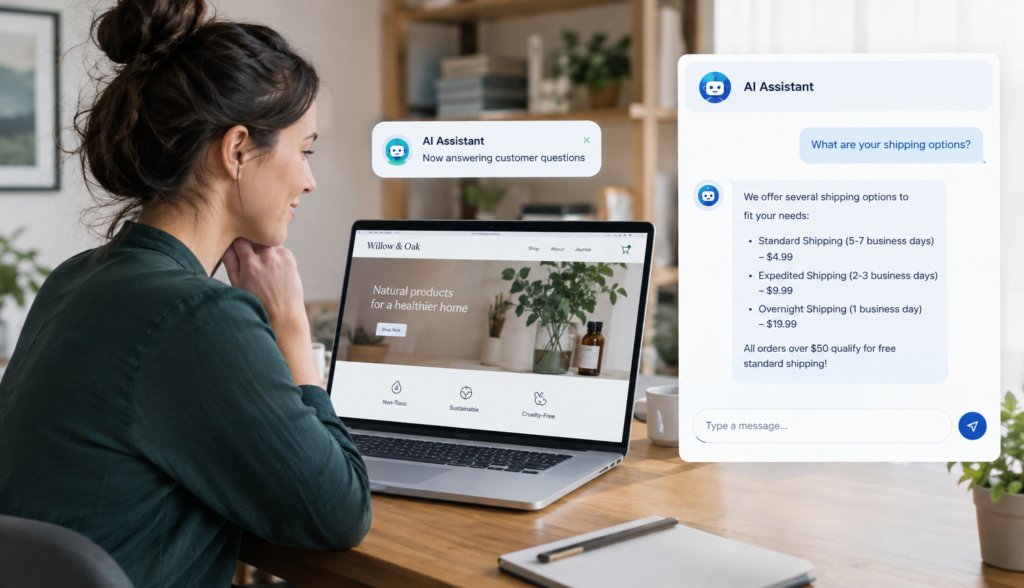
If you run a small business website, you may already know the problem: customers visit your site with real questions, but they do not always know where to click. They may search for a product, compare service options, look for return policies, or ask whether you serve their location. If they cannot find the answer quickly, they may leave, call your team, or choose a competitor. That is where **AI search for small business** becomes worth considering—not as a complicated enterprise software project, but as a practical way to help visitors find accurate answers faster.
Traditional website search often works only when people type the exact right keywords. AI-powered search is different. It can understand natural language questions, connect related ideas, and respond using information from your own website, FAQs, product pages, documents, and approved business content.
For a small business, the question is not “Do we need advanced AI?” The better question is: “Are customers struggling to find answers that already exist on our website?” If the answer is yes, AI search may solve a practical business problem.
## Why Website Search Is Hard for Small Businesses
Small business websites often grow over time. You may start with a few service pages, then add blog posts, product pages, FAQs, policy pages, PDF brochures, pricing details, and support information. Before long, the site contains useful information—but it is spread across many pages.
That creates several common challenges:
– Customers do not know which page contains the answer.
– Product or service names may be confusing or similar.
– Internal website search returns too many irrelevant results.
– Important answers are buried in PDFs or long pages.
– Staff members keep answering the same questions by phone, email, or chat.
– Visitors abandon the site before contacting the business or buying.
This is especially common for ecommerce stores, local service providers, B2B companies, healthcare offices, education providers, home service businesses, and professional services firms.
For example, a customer might type:
– “Do you install heat pumps in condos?”
– “Which trail running shoe is best for wet conditions?”
– “Can I reschedule my appointment?”
– “Do you offer bulk pricing for small offices?”
– “What documents do I need before my consultation?”
A basic keyword search may struggle with these questions because the exact phrase may not exist on the site. AI search can interpret the intent behind the question and find the most relevant answer from your approved content.
## What Is AI Search for Small Business?
**AI search for small business** is a smarter way for website visitors to ask questions and find information using everyday language. Instead of forcing users to search by exact keywords, AI search lets them type or ask questions the way they would ask a salesperson, support agent, or front desk employee.
For example, instead of searching “return policy unopened item 30 days,” a visitor might ask:
“Can I return something if I opened the box?”
AI search can look through your return policy, product rules, and FAQ content to provide a direct answer, often with a link to the source page for more detail.
The goal is not to replace your whole website. It is to make your existing website content easier to access.
### How It Differs From Traditional Site Search
Traditional site search usually matches words. If a visitor searches “pricing,” it looks for pages that include that word. If your website uses “rates,” “plans,” or “service packages” instead, traditional search may miss relevant pages.
AI search uses a more flexible approach. It can understand that related terms may point to the same idea. This is often called **semantic search**.
In simple terms, semantic search focuses on meaning, not just matching words. It helps the system understand that:
– “Cost,” “price,” “rates,” and “fees” may be related.
– “Shipping time” and “delivery estimate” may mean similar things.
– “Book a visit” and “schedule an appointment” may point to the same action.
This makes search more useful for real customers, because real customers rarely use the exact language your website team used when writing the page.
## Key AI Search Terms Explained Simply
AI search can sound technical, but the main concepts are easier to understand when translated into business language.
### Artificial Intelligence
In this context, AI refers to software that can understand questions, identify relevant information, and generate a helpful response. It does not mean the system “knows” your business on its own. It needs access to accurate, approved information.
For a business website, that information might include:
– Service pages
– Product descriptions
– FAQs
– Blog posts
– Help center articles
– Return and shipping policies
– Pricing pages
– PDF documents
– Internal knowledge base content approved for customer use
### Natural-Language Search
Natural-language search means people can ask questions in normal sentences instead of using short keyword phrases.
For example:
– Keyword search: “warranty dishwasher”
– Natural-language search: “How long is the warranty on this dishwasher?”
This is important because customers do not want to learn how your website search works. They just want an answer.
### Semantic Search
Semantic search helps the system understand meaning and context. It connects a user’s question to relevant content even if the words do not match exactly.
For instance, if your website says “complimentary consultation” and a visitor asks “Do you offer a free first appointment?” semantic search can recognize that those ideas are related.
### RAG
RAG stands for **retrieval-augmented generation**. The term sounds technical, but the idea is straightforward.
First, the system retrieves relevant information from your approved business content. Then it uses that information to generate an answer.
For small businesses, this matters because it helps the AI stay grounded in your own website content instead of giving a broad, generic response. A RAG-based system is designed to answer based on what your business has actually published or provided.
## Do Small Businesses Really Need AI Search?
Not every small business needs AI search right away. A simple five-page brochure website may not have enough content or customer questions to justify it. But many businesses reach a point where customers need better guidance.
You may be ready for AI search if:
– Your website has many products, services, locations, or policies.
– Customers repeatedly ask questions already answered somewhere on the site.
– Your team spends time directing people to the right page.
– Visitors use search but do not convert.
– Customers need help choosing between options.
– You sell products with technical details, compatibility questions, or variations.
– You have valuable PDFs, guides, or support documents that visitors rarely find.
– Your business receives inquiries from people who are not sure what they need yet.
AI search is most useful when there is enough content to search and enough customer intent to guide. It helps close the gap between “we have the answer somewhere” and “the customer found the answer quickly.”
## Setup Does Not Have to Be an Enterprise Project
A common concern is that AI search sounds like something only large companies can implement. In the past, that may have been true. Many advanced search tools required developers, custom integrations, complex data pipelines, and ongoing technical management.
For small businesses, that approach is usually unrealistic.
Modern AI website search tools are becoming more accessible. Instead of building a custom AI system from scratch, businesses can connect an AI assistant to existing website content and approved business information.
A typical setup may involve:
1. **Identifying content sources**
This includes your website pages, product information, FAQs, policy pages, help articles, and documents.
2. **Reviewing content quality**
AI search works best when the source information is clear, accurate, and current. If your policies are outdated or product pages are thin, it may be worth improving those first.
3. **Defining what the AI should and should not answer**
For example, a medical office may want the assistant to explain office policies but not provide medical advice. An ecommerce store may want it to answer shipping questions but avoid making promises outside official policy.
4. **Adding the search or chat interface to the website**
This may appear as a search bar, chatbot-style assistant, embedded widget, or guided help tool.
5. **Testing common questions**
Before going live, test the questions customers actually ask. Check whether answers are accurate, helpful, and linked to the right sources.
6. **Monitoring and improving over time**
Search logs can reveal missing content, confusing policies, and customer needs you may not have noticed.
This is where a business-focused tool such as Chatbotbiz.ai fits in. It is designed to work with a company’s own website content, product details, FAQs, documents, and approved information so visitors can ask questions in natural language and receive relevant answers.
## How AI Search Supports Customer Service
Customer service is one of the clearest use cases for AI search. Many customer questions are important but repetitive. They may not require a live employee, but they do require a clear and accurate answer.
Common examples include:
– “What are your hours?”
– “Do you ship to my state?”
– “How do I change my appointment?”
– “What is your refund policy?”
– “Which plan includes support?”
– “Where can I find installation instructions?”
– “Do I need an account to order?”
If the answer exists on your website, AI search can help customers find it immediately. This can reduce avoidable emails and calls while giving your team more time for complex or high-value conversations.
It can also improve the customer experience outside normal business hours. A visitor researching at 9:30 p.m. may not want to wait until morning for a simple answer. AI search can provide guidance when your staff is unavailable.
The key is accuracy. A helpful AI assistant should rely on approved business content, show relevant links when possible, and avoid guessing when the answer is not available. For small businesses, it is better for the system to say “I could not find that information” than to provide a confident but incorrect answer.
## How AI Search Helps With Lead Generation
AI search is not just a support tool. It can also help turn website visitors into leads.
Many potential customers arrive with questions before they are ready to contact you. They may be comparing options, checking fit, or trying to understand whether your business solves their problem. If they cannot find answers, they may leave without filling out a form.
AI search can support lead generation by helping visitors:
– Understand which service is right for them.
– Compare product features or service packages.
– Find pricing or request-a-quote information.
– Locate case studies, guides, or examples.
– Confirm eligibility, service area, or availability.
– Move from research to a contact form, booking page, or product page.
For example, a commercial cleaning company might have separate pages for offices, medical facilities, schools, and retail spaces. A visitor may ask, “Do you clean small dental offices after hours?” AI search can point them to the relevant service information and guide them toward requesting an estimate.
An ecommerce store might have hundreds of products. A shopper may ask, “Which backpack fits a 16-inch laptop and works as a carry-on?” AI search can help narrow choices based on product descriptions and specifications.
In both cases, the AI search experience helps the visitor make progress. It does not replace your sales process; it helps more people reach the right next step.
## What About ROI?
Small businesses should be careful with any new tool. AI search should support measurable business goals, not just sound impressive.
The return on investment may come from several areas:
### Fewer Repetitive Support Questions
If your staff spends time answering the same basic questions, AI search can help reduce that workload. The value depends on how many inquiries you receive and how much time your team spends responding.
### Better Website Engagement
When visitors find relevant answers, they are more likely to continue exploring your site. This can support product discovery, service education, and trust-building.
### More Qualified Leads
AI search can help visitors self-qualify before contacting you. If people understand your services, pricing structure, process, or requirements before submitting a form, your sales conversations may be more productive.
### Higher Conversion Potential
For ecommerce and lead-generation websites, search quality can influence conversions. If customers can find the right product, policy, or service faster, they have fewer reasons to abandon the process.
### Content Improvement Insights
AI search can show what visitors are asking. Those questions can help you identify missing pages, unclear product descriptions, weak FAQs, or content gaps. Over time, this can improve both your website and your customer experience.
To evaluate ROI, track practical metrics such as:
– Common customer questions
– Search usage
– Clicks from AI answers to key pages
– Contact form submissions
– Product page visits
– Support ticket volume
– Live chat or phone inquiry trends
– Customer feedback on answer quality
You do not need a complex analytics program to start. Even reviewing the most common questions can reveal valuable patterns.
## When AI Search May Not Be the Right Fit
AI search is useful, but it is not a cure for every website problem.
It may not help much if:
– Your website has very little content.
– Your business information is outdated or inconsistent.
– Your products or services are not clearly described.
– You expect the AI to answer questions outside your approved information.
– You need a fully custom enterprise search system with complex internal data access.
– Your main issue is poor website design, not search or content discovery.
In some cases, the first step should be improving your website content. AI search performs best when it has strong information to work with. Clear service pages, complete product descriptions, accurate FAQs, and updated policies all make AI-powered search more effective.
## How to Prepare Your Website for AI Search
Before adding AI search, small businesses can take a few practical steps.
### Review Your Most Common Questions
Ask your sales, support, and front desk teams what customers ask every week. These questions should be easy for AI search to answer from your website.
### Update Key Pages
Make sure your most important pages are current, especially:
– Services
– Products
– Pricing or quote process
– Locations
– Hours
– Contact information
– Shipping and returns
– Booking or appointment policies
– Support instructions
### Improve Product and Service Descriptions
Short or vague descriptions limit what AI search can answer. Add useful details that help customers choose, compare, or understand next steps.
### Organize Policies Clearly
Policies should be written in plain language. If your return policy, cancellation rules, or warranty terms are hard for humans to understand, AI may also struggle to summarize them clearly.
### Decide Where Human Help Is Required
AI search should make it easy to escalate to a person when needed. Some questions require judgment, sensitive information, or a custom quote.
## So, Do You Really Need AI Search for Small Business?
You may not need AI search simply because it is popular. You may need it if your customers are asking questions your website already answers—but they cannot easily find those answers.
**AI search for small business** is most valuable when it solves a real customer experience problem: helping visitors search naturally, get relevant answers, and take the next step with confidence. It can support customer service, lead generation, ecommerce product discovery, and website engagement without requiring an enterprise-level technology team.
The best starting point is simple: look at your customer questions, review your website content, and identify where people get stuck. If your site contains useful information that visitors are not finding, AI-powered search may be a practical next step.