
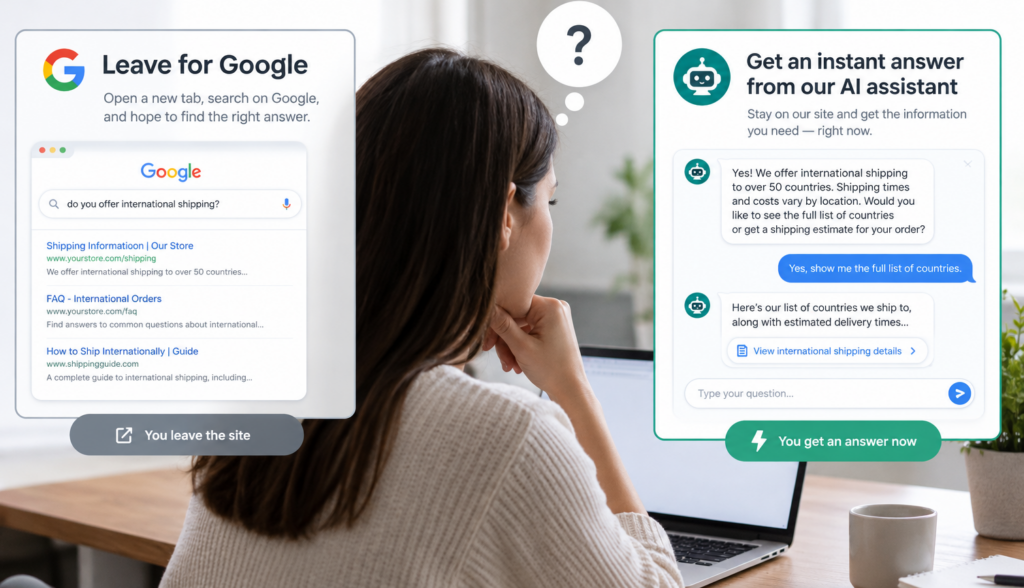
A visitor lands on your website with a question. Maybe they want to know whether a product comes in a specific size, how your pricing works, whether you ship to their location, or which service is right for their business. If the answer is hard to find, their next step is often predictable: they go back to Google. That moment is where the question of **website search vs Google** becomes important. When customers leave your site to search for information elsewhere, you risk losing their attention to ads, competitors, comparison pages, outdated content, or unrelated results.
Google is excellent for helping people discover websites. But once someone is already on your website, sending them back to Google to find answers is not ideal. Your site should help visitors move forward with confidence, whether that means reading the right page, choosing a product, booking a consultation, or contacting your team.
That is where **AI site search** becomes valuable. Instead of forcing users to guess the right menu path or search keyword, AI-powered search helps them ask questions naturally and receive answers based on your approved website content, FAQs, product data, and documents.
## The real problem: visitors abandon websites when answers are hard to find
Most website visitors are not casually browsing every page. They usually arrive with a task in mind:
– “Do you offer this service in my area?”
– “Is this product compatible with what I already have?”
– “What is your return policy?”
– “Which plan is best for a small business?”
– “Can I get this delivered by Friday?”
– “Where is your pricing?”
If your website structure is simple and your content is easy to navigate, many visitors will find what they need. But as websites grow, information often becomes scattered across product pages, blog posts, PDFs, help articles, FAQ pages, and policy pages.
That creates friction. Visitors may not know what you call a specific service. They may use different words than your internal team uses. They may not want to click through five navigation menus or read several long pages.
When people cannot find answers quickly, they do one of three things:
1. Leave and search Google.
2. Contact your team for basic information.
3. Abandon the task completely.
All three outcomes create problems. Returning to Google exposes them to distractions. Contacting support for simple questions increases workload. Leaving entirely means a missed opportunity.
A better website experience helps visitors stay engaged and get answers before frustration sets in.
## Website search vs Google: different tools for different moments
Google and your website search serve different purposes. Google is designed to search the open web. Your site search should be designed to help people search your business.
That difference matters.
Google helps users discover many possible sources. It may show your website, your competitors, ads, map listings, review sites, videos, forums, and AI-generated summaries. That is useful when someone is doing broad research.
But when a visitor is already on your site, they are no longer searching the entire internet. They are trying to understand your business, your products, your policies, or your expertise. At that point, your website should become the best source of truth.
Traditional website search often fails because it depends heavily on exact keyword matching. If a visitor searches “cancel order” but your page says “modify or stop a purchase,” the search tool may not return the right result. If they ask a full question, such as “Can I return an item after opening it?” a basic search bar may simply show a list of pages containing “return” and “item.”
AI site search works differently. It can understand the meaning behind the question, not just the exact words. That makes it much better suited for customers who describe their needs in everyday language.
## Why sending visitors back to Google creates risk
Google is a powerful acquisition channel, but it is not a controlled customer experience. Once a visitor leaves your site, you no longer control what they see next.
### Competitors may appear before your answer
A customer might search for your return policy, pricing, product comparison, or service details. Even if your own page appears in the results, competitors may appear nearby through ads, organic listings, review sites, marketplace results, or comparison articles.
For example, a visitor on a software company’s website might search Google for “[company name] pricing.” The results could include competitor ads for “better alternatives,” third-party review pages, or old discussions that do not reflect current information.
The customer’s original goal was simple: find pricing. But because the website did not make that information easy to access, the visitor is now evaluating other options.
### Ads can redirect attention
Paid search ads are designed to capture intent. If someone leaves your website and searches Google for a product, service, or policy question, ads may appear above organic results. Those ads might come from direct competitors, marketplaces, lead aggregators, or comparison sites.
Even a highly interested visitor can be pulled away by a compelling ad headline or promotion.
### Search results may not reflect your best information
Google’s index may include old pages, third-party mentions, cached snippets, or content that is not the best answer to the customer’s question. Even when your website appears in the results, the displayed page may not be the most useful one.
Your own on-site search experience can guide visitors to the right information more directly, especially when it is powered by AI and connected to approved content.
### The customer journey becomes fragmented
A strong website experience keeps the visitor moving smoothly from question to answer to action. When they leave for Google, the journey becomes fragmented. They may open multiple tabs, compare unrelated results, read reviews, watch videos, or forget why they came to your site in the first place.
This does not mean businesses should avoid Google. Search engines are essential for visibility. But once visitors arrive, your website should be prepared to answer their next question.
## What modern site search should do
A search box that returns a list of loosely related pages is no longer enough for many business websites. Visitors are used to asking full questions and receiving direct, helpful answers.
Modern site search should help users:
– Ask questions in natural language
– Find relevant products, services, policies, or articles
– Get concise answers with links to source pages
– Discover related information they may need next
– Avoid repeating searches with different keywords
– Move toward a decision or next step
For ecommerce websites, this might mean helping shoppers find products by use case, size, compatibility, material, availability, or budget. For service businesses, it might mean answering questions about process, qualifications, service areas, timelines, or pricing models. For B2B companies, it might mean making technical documents, case studies, FAQs, and product information easier to access.
Good site search is not just a convenience feature. It supports customer retention, lead generation, support efficiency, and conversion optimization.
## How AI site search improves the customer experience
AI site search uses artificial intelligence to understand questions and retrieve relevant information from your website or approved knowledge sources. The goal is not to replace your content. The goal is to make your content easier to use.
### Natural-language search
Natural-language search allows visitors to type questions the way they would ask a person.
Instead of searching:
“shipping policy Alaska”
A visitor can ask:
“Do you ship to Alaska, and how long does it usually take?”
Instead of searching:
“enterprise plan users integrations”
They can ask:
“Which plan should I choose if I need multiple users and integrations with my CRM?”
This is especially helpful when customers do not know your exact product names, service categories, or internal terminology.
### Semantic search
Semantic search focuses on meaning, not just matching keywords. It can understand that “refund,” “money back,” and “return payment” may be related. It can connect “small business package” with content about “starter plans” if the meaning aligns.
For businesses, this matters because customers often use different language than the company uses. Your navigation may say “solutions,” while your customer searches for “services.” Your product page may say “moisture resistant,” while the shopper searches for “can this be used in a bathroom?”
Semantic search helps bridge that language gap.
### Retrieval-augmented generation, or RAG
RAG stands for retrieval-augmented generation. In simple terms, it means the AI first retrieves relevant information from approved sources, then uses that information to generate an answer.
For a business website, this is important. A general-purpose AI tool may answer based on broad internet knowledge, which may not match your actual policies, products, or services. A RAG-based site assistant can be designed to work from your content: pages, FAQs, product data, PDFs, help documents, and other approved materials.
That makes the answer more useful and more aligned with your business. It also allows the assistant to provide links back to the relevant pages, so visitors can verify details or keep exploring.
## Site search and customer retention
Customer retention is not only about loyalty programs or follow-up emails. It starts with the quality of every interaction.
When customers can easily find what they need, they are more likely to trust your website and continue engaging with your business. This applies before and after a purchase.
Before a purchase, better search can help visitors:
– Compare products or services
– Understand policies
– Check availability
– Find pricing or quote information
– Learn whether your solution fits their needs
After a purchase, better search can help customers:
– Find setup instructions
– Understand warranty details
– Get answers to support questions
– Locate documentation
– Learn how to get more value from the product or service
If customers must leave your site every time they need help, the relationship weakens. If your website consistently provides answers, it becomes a trusted resource.
## AI search can also reduce support workload
Many customer questions are repetitive. Teams often answer the same questions about hours, pricing, returns, shipping, onboarding, compatibility, service areas, or documentation.
AI-powered site search can help by answering common questions directly from existing content. This does not eliminate the need for human support, especially for complex or sensitive issues. But it can reduce unnecessary inquiries and help customers self-serve when their questions are straightforward.
For example:
– A shopper asks, “Can I return this if it does not fit?”
– A patient asks, “Do I need a referral?”
– A business buyer asks, “Do you integrate with QuickBooks?”
– A homeowner asks, “Do you provide service in my ZIP code?”
– A customer asks, “Where can I download the installation guide?”
If those answers already exist somewhere on your site or in your approved documents, AI site search can make them easier to access.
## Where traditional navigation falls short
Clear navigation is still important. Menus, category pages, filters, internal links, and well-organized content all matter. AI search should not be used as an excuse for a confusing website.
However, navigation works best when users understand your structure. Search works best when users already know what they want.
Many visitors fall somewhere in between. They have a question but do not know where it belongs. They may not know whether to look under “Resources,” “Support,” “Products,” “Services,” or “About.”
AI site search helps by giving users another path. Instead of forcing them to understand your sitemap, it lets them ask directly.
This is especially useful for:
– Large ecommerce catalogs
– Service businesses with many offerings
– B2B websites with technical content
– Healthcare, legal, or financial sites with detailed information
– Companies with extensive FAQs or documentation
– Businesses that serve multiple customer types
The more content your site has, the more important it becomes to help visitors find the right answer quickly.
## Keeping users on your website supports conversion
Conversions usually depend on confidence. A visitor is more likely to take action when their concerns have been addressed.
Those concerns may be practical:
– “How much does it cost?”
– “How long will it take?”
– “Is this available near me?”
– “Will this work with what I already have?”
They may also be emotional:
– “Can I trust this company?”
– “Is this the right choice?”
– “What happens if something goes wrong?”
– “Will I be supported after I buy?”
When answers are easy to find, visitors can keep moving. When answers are hidden, they pause. If the pause is long enough, they leave.
AI-powered site search can support conversion by helping visitors resolve uncertainty without leaving the page or opening a new browser tab. It can guide them to product pages, service explanations, booking forms, contact pages, documentation, or helpful articles based on what they ask.
The goal is not to trap users on your website. The goal is to serve them well enough that they do not need to leave to get basic answers.
## What to look for in an AI site search solution
Not every AI chatbot is designed for business website search. Some tools are general-purpose assistants that answer broad questions. For your website, you need something more specific: an AI assistant connected to your business content.
When evaluating AI site search, consider whether it can:
– Use your approved website content and documents
– Understand natural-language questions
– Search across product information, FAQs, service pages, and policies
– Provide answers with links to source pages
– Avoid making unsupported claims when information is unavailable
– Be updated as your content changes
– Reflect your brand tone and customer experience goals
– Support both pre-sale and post-sale questions
Chatbotbiz.ai is built for this kind of use case: an AI assistant and intelligent site search solution designed specifically for business websites. Rather than acting like a general chatbot, it works with a company’s own content, product information, FAQs, documents, and approved knowledge sources to help customers find relevant answers.
For businesses, that distinction is important. The value comes from making your own information easier to access.
## Improving site search starts with better content
AI search works best when it has strong source material. If your website content is incomplete, outdated, or unclear, your search experience will be limited.
Before or alongside implementing AI site search, review your content for common customer questions:
– Are your policies easy to understand?
– Do product pages answer practical buying questions?
– Are service pages specific enough?
– Is pricing or quote information explained clearly?
– Do FAQs reflect real customer concerns?
– Are important PDFs or documents accessible?
– Are outdated pages removed or updated?
AI can help users find and understand your content, but it should not be expected to make up for missing business information. The stronger your knowledge base, the more helpful your site search can become.
## Conclusion: your website should answer the next question
Google is essential for discovery, but it should not be the place customers must return to every time they have a question about your business. The issue of **website search vs Google** is really about control, clarity, and customer experience. Once visitors are on your website, they should be able to find accurate answers without being pushed back into a search results page full of competitors, ads, and distractions.
AI site search helps by turning your website into a more useful resource. It allows visitors to ask natural questions, receive relevant answers, and continue their journey with fewer interruptions. For business owners, ecommerce managers, marketers, and website teams, that can mean better engagement, fewer avoidable support questions, and a smoother path to conversion.
The best search experience is not about replacing Google. It is about making sure that when customers reach your website, they have a good reason to stay.