
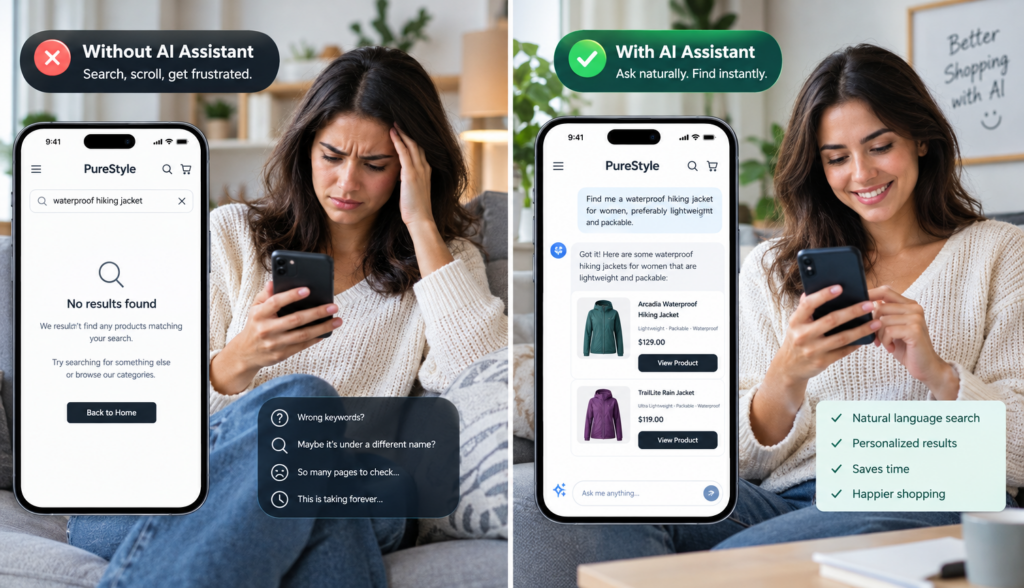
You paid to bring someone to your website. Maybe they clicked an ad, found you through search, followed an email, scanned a QR code, or came from a social post. They arrived with intent. Then they could not find the answer, product, service, size, price, location, policy, or next step they needed. So they left. If you want to improve website search, that is the problem to solve: not just helping people “search,” but helping high-intent visitors move forward before frustration turns into abandonment.
A website can have great content, strong offers, clear branding, and quality products, yet still underperform if visitors have to work too hard to find what they came for. People rarely leave because your business has nothing useful to offer. More often, they leave because the path to the right information is too slow, too confusing, or too hidden.
## The Real Cost of Acquiring Visitors You Do Not Convert
Most businesses focus heavily on getting more traffic. That makes sense: no visitors means no leads, sales, bookings, or inquiries. But every visitor has a cost, even if you do not pay for each click directly.
That cost may include:
– Paid search and social advertising
– SEO content creation
– Email marketing
– Website design and development
– Brand awareness campaigns
– Sales and marketing software
– Time spent creating product pages, service pages, blogs, and FAQs
When a visitor arrives and leaves without taking action, the problem is not only a lost conversion. It is also wasted acquisition effort.
For ecommerce businesses, the result may be an abandoned product search or cart. For service businesses, it may be a missed quote request. For B2B companies, it may be a potential buyer who never finds the right solution page, documentation, or contact path. For local businesses, it may be someone who cannot quickly confirm service areas, hours, pricing, or availability.
Traffic is valuable only if visitors can use your website effectively. That is why website search, navigation, and on-page answers are not small usability details. They directly affect whether your marketing investment produces results.
## Search Friction: The Silent Conversion Killer
Search friction happens when visitors know what they want but cannot easily find it.
Sometimes the issue is obvious. A search bar returns “no results” even when relevant information exists on the site. Other times, the friction is less visible. A visitor clicks through multiple pages, scans long menus, opens several product filters, and still cannot get a clear answer.
Common forms of search friction include:
– Search tools that require exact keyword matches
– Product names that do not match customer language
– Long FAQ pages that are hard to scan
– Navigation menus designed around internal departments instead of customer questions
– Content buried in PDFs, documentation, or blog posts
– Filters that are too limited or confusing
– Service pages that do not answer practical buying questions
– Search results that list pages but do not provide direct answers
For example, a customer might search for “waterproof hiking shoes for wide feet,” while your product page uses the phrase “trail footwear, extended width, weather-resistant.” A traditional search tool may not understand that these phrases are related. The visitor sees weak results or no results, assumes you do not carry what they need, and leaves.
This is where improving website search becomes more than a technical upgrade. It becomes a customer experience improvement.
## Why “No Results” Often Means “No Patience”
Website visitors do not think like your internal team. They do not always know your product names, service categories, or preferred terminology. They may use incomplete phrases, misspell words, or ask questions in a conversational way.
A traditional search box often works like a basic matching tool. If the visitor’s words do not closely match the words on your page, the experience breaks down.
That creates a common but costly disconnect:
– Your website has the right information.
– The visitor asks for it in different words.
– The search tool fails to connect the two.
– The visitor leaves.
From the customer’s point of view, there is little difference between not having the answer and hiding the answer. If they cannot find it quickly, they may assume your business is not a fit.
This matters because many visitors who use site search are already showing intent. They are not casually browsing. They are trying to solve a problem, compare options, confirm a detail, or make a decision. Losing those visitors means losing some of the people most likely to convert.
## Mobile Users Have Even Less Patience
Search friction is worse on mobile devices.
A desktop visitor may tolerate extra clicks, multiple tabs, and detailed navigation. A mobile visitor is working with a smaller screen, shorter attention span, and often a more immediate need. They may be standing in a store aisle, sitting in a car, comparing vendors between meetings, or trying to complete a task quickly.
On mobile, every extra step feels bigger:
– Long menus are harder to browse.
– Product grids are slower to scan.
– PDFs are difficult to read.
– Filters can be clunky.
– Typing long search queries is inconvenient.
– Pages that require lots of pinching, scrolling, or backtracking create frustration.
Mobile visitors often want direct answers. Do you have this item in stock? Do you serve my area? What size should I order? Can I return this? Does this work with my existing system? How much does it cost? Can I book an appointment?
If those answers are buried, mobile users are likely to leave. A better search experience helps them ask in their own words and get to the right answer without hunting through the entire site.
## Unanswered Questions Block Buying Decisions
Most customers do not convert the moment they land on a website. They move through a series of questions, large and small, before they take action.
For ecommerce, those questions might include:
– Is this product compatible with what I already own?
– What is the difference between these two models?
– What materials, sizes, or colors are available?
– How long does shipping take?
– What is the return policy?
– Is this good for my specific use case?
For service businesses, visitors might ask:
– Do you offer this specific service?
– What areas do you serve?
– How does your process work?
– What does pricing depend on?
– How soon can I schedule?
– Are you qualified to handle my situation?
For B2B companies, buyers may need to know:
– Does this solution integrate with our tools?
– Is it designed for our industry?
– What documentation is available?
– What security or compliance information can we review?
– What happens after we request a demo?
When these questions go unanswered, visitors hesitate. Hesitation often leads to abandonment.
A website does not need to answer every possible question on a single page. But it does need a way to help visitors find the right information quickly. That may come through strong navigation, helpful content, product filters, internal linking, and increasingly, intelligent site search that can understand natural-language questions.
## How Bounce and Abandonment Affect Business Performance
When visitors leave because they cannot find what they need, the impact spreads across your marketing and sales funnel.
First, conversion rates suffer. If fewer visitors reach product pages, forms, carts, booking tools, or contact options, fewer visitors turn into customers or leads.
Second, advertising efficiency declines. Paid campaigns may appear to underperform even when the targeting is good. The ad may have brought the right person to the site, but the website experience failed to support the next step.
Third, customer support volume can increase. If customers cannot find answers on the website, they may call, email, or chat with your team for information that already exists somewhere online. That creates extra workload and slows down response times.
Fourth, customer confidence can weaken. A confusing website can make a business feel harder to work with, even if the company itself is excellent. Visitors may wonder: If it is this difficult to find a simple answer now, what will the buying or support experience be like later?
Bounce rate and abandonment are not always caused by poor search. Some visitors are simply not a fit. But when high-intent visitors cannot locate information that exists on your site, search friction becomes a measurable business problem.
## Why Traditional Site Search Often Falls Short
Many website search tools were built for simple keyword matching. They look for exact words or close variations, then return a list of pages. That can work for straightforward searches, but it often fails when visitors search the way they actually think.
A customer may not know the exact product title. A prospect may describe a problem instead of naming a service. A buyer may ask a full question instead of typing a keyword.
Traditional search may struggle with:
– Synonyms and related phrases
– Misspellings or informal wording
– Long, question-based searches
– Product attributes that appear across multiple fields
– Information stored in documents or support content
– Matching customer intent to the best page or answer
For example, if someone types “how do I clean this after outdoor use,” a basic search tool may not connect that question to a care instructions page unless the exact words appear there. A more intelligent search experience can understand that the visitor is asking about maintenance, cleaning, and product care.
This is one reason businesses are looking for ways to improve website search using AI-powered tools that go beyond exact keyword matching.
## Improve Website Search With Conversational Search
Conversational search allows visitors to ask questions in normal language and receive useful answers or recommended next steps. Instead of forcing people to guess the right keyword, it lets them search the way they would ask a knowledgeable employee.
For example:
– “Which plan is best for a small team?”
– “Do you have black leather boots in size 9?”
– “What is your warranty on commercial equipment?”
– “Can this software connect to Shopify?”
– “Do you offer emergency repair in Phoenix?”
– “What is the difference between these two products?”
The goal is not to replace your website. The goal is to make your website easier to use.
A conversational search experience can guide visitors to relevant pages, summarize approved information, answer common questions, and suggest logical next actions. For businesses with large websites, product catalogs, FAQs, help centers, or technical documents, this can reduce the effort required to find the right information.
## Semantic Search, AI, and RAG Explained Simply
AI site search can sound complex, but the business purpose is straightforward: help people find better answers faster.
Here are a few terms explained in plain language.
### Semantic Search
Semantic search focuses on meaning, not just exact words. It tries to understand what the visitor is looking for, even if they use different wording than your website.
If a visitor searches for “affordable patio furniture that can handle rain,” semantic search may understand related terms such as outdoor furniture, weather-resistant materials, aluminum frames, waterproof cushions, and budget-friendly sets.
### Natural-Language Search
Natural-language search allows people to ask questions the way they speak or write. Instead of typing “return policy shoes worn,” they might ask, “Can I return shoes after trying them on?”
This is useful because customers do not always think in keywords. They think in questions.
### AI-Powered Answers
AI can help interpret the question, locate relevant information, and present a clear response. For business websites, this should be based on approved company content rather than open-ended guesses.
That distinction matters. A business website assistant should answer from your product information, service pages, FAQs, policies, documents, and other trusted sources.
### RAG
RAG stands for retrieval-augmented generation. In simple terms, it means the AI first retrieves relevant information from approved sources, then uses that information to generate an answer.
For website owners, the value is control and relevance. Instead of relying only on a general AI model, a RAG-based approach can ground answers in the business’s own content. That helps the assistant respond based on what your company has actually published or provided.
## What Better Website Search Looks Like in Practice
Improving site search does not mean adding a flashy widget and hoping for the best. A useful search experience should support real customer behavior.
A strong website search experience may include:
– A visible search or chat-style interface
– Support for full questions, not just short keywords
– Results based on meaning and intent
– Answers drawn from approved website content and documents
– Links to relevant pages, products, forms, or resources
– Mobile-friendly usability
– The ability to handle product, service, support, and policy questions
– Clear fallback options when an answer is not available
Consider an ecommerce store that sells specialty parts. A customer may not know the exact part name but can describe the machine, model, and problem. Intelligent search can help connect that description to relevant products or documentation.
Or consider a professional services firm. A visitor may ask, “Do you help businesses with employee handbook updates?” Even if the service page is titled “HR Compliance Consulting,” semantic search can connect the intent and guide the visitor to the right content.
Or consider a software company. A buyer might ask, “Does this integrate with HubSpot?” Instead of searching through multiple documentation pages, the visitor can receive a concise answer with a link to the integration details.
Each of these examples reduces friction. The visitor spends less time searching and more time deciding.
## How AI Site Search Supports Marketing, Sales, and Support
Better search benefits more than the user experience. It can support multiple business functions.
For marketing teams, improved search helps convert more of the traffic they already work hard to attract. It can also reveal what visitors are asking for, which may help guide future content, SEO, and landing page improvements.
For sales teams, it can help answer early-stage questions before a prospect books a call. When visitors can self-educate, they may arrive at sales conversations better informed.
For support teams, it can reduce repetitive questions by making policies, instructions, troubleshooting content, and documentation easier to access.
For website managers, it can improve usability without requiring every visitor to follow the same rigid navigation path. Different customers can ask different questions and still reach useful answers.
This is where a business-focused solution such as Chatbotbiz.ai fits. It is designed to work with a company’s own website content, product information, FAQs, documents, and approved knowledge sources to provide natural-language answers and intelligent site search. The purpose is not to act like a general-purpose chatbot, but to help business website visitors find accurate, relevant information more easily.
## Practical Steps to Improve Website Search
Before adding any new technology, it helps to review where visitors may be getting stuck.
Start by asking:
– What are the most common questions customers ask before buying?
– Which pages have high traffic but low conversion?
– What terms do visitors search for on the site?
– Are search results useful, or do they often lead nowhere?
– Are important answers buried in PDFs, blog posts, or long FAQ pages?
– Does mobile navigation make key information easy to find?
– Do product and service pages use the same language customers use?
Then look for opportunities to reduce effort:
– Add clearer labels to navigation and categories.
– Update product and service pages with practical buying questions.
– Use internal links to connect related content.
– Make policies, pricing guidance, availability, and contact options easier to locate.
– Organize FAQs around customer intent, not internal structure.
– Consider AI-powered site search for larger or more complex websites.
The best search experience combines good content, clear structure, and intelligent retrieval. AI cannot fix missing or poor-quality information. But when your website already contains useful content, AI site search can help visitors access it more naturally.
## Conclusion: Help Visitors Find the Next Step Faster
Customers leave when your website makes them work too hard. They may want to buy, book, compare, ask, verify, or learn, but if the answer is hidden behind weak search, confusing navigation, or unclear content, many will not stay long enough to find it.
The business cost is real: wasted traffic, lower conversions, more support requests, and missed opportunities from visitors who were already interested.
To improve website search, focus on reducing friction. Make your content easier to understand, organize information around customer questions, support mobile users, and consider conversational search that lets visitors ask in their own words. AI-powered site search, when grounded in your approved business content, can help turn a frustrating search experience into a clear path forward.
The easier it is for people to find what they need, the more likely they are to stay, trust your business, and take the next step.