
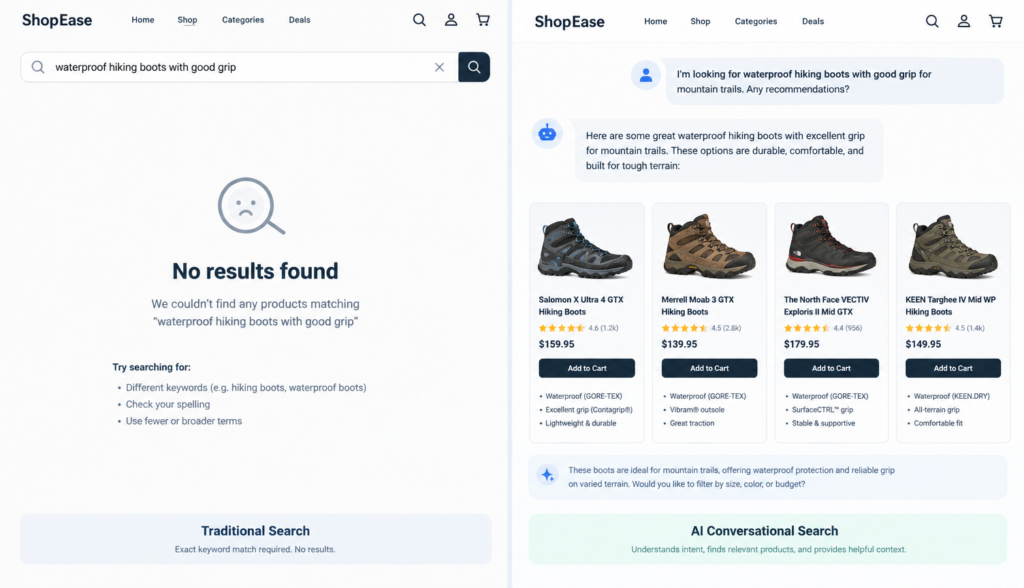
A customer lands on your website ready to buy. They see your search box, type what they want, and expect a helpful answer. Instead, they get irrelevant products, a “no results found” page, or a list that forces them to guess which item matches their need. That moment may seem small, but poor website search can quietly interrupt the buying journey and send motivated shoppers somewhere else.
For ecommerce businesses, the search box is not just a navigation feature. It is a high-intent sales tool. People who use ecommerce site search often know what they are looking for, or at least know the problem they need to solve. If your search experience cannot understand their words, handle product variations, or guide them through uncertainty, you may lose sales that were already close to happening.
Traditional search boxes were built for simple keyword matching. Modern shoppers, however, search in much more natural and varied ways. They use phrases, questions, brand names, symptoms, use cases, abbreviations, and sometimes the wrong terminology entirely. If your search tool only looks for exact matches, it may fail even when the right product is sitting in your catalog.
## Why website search matters more than many businesses realize
Many websites treat search as a basic utility: place a search bar in the header, connect it to product pages, and assume the job is done. But customers do not experience it that way. To them, search is a conversation with your website.
When someone types into your website search box, they are asking for help. They might be asking:
– “Do you sell the part I need?”
– “Which product fits my situation?”
– “Where is the replacement item?”
– “What is compatible with this model?”
– “Can I solve this problem without calling support?”
If the answer is confusing, incomplete, or unavailable, the customer may not blame the search tool. They may assume you do not carry the product, your site is hard to use, or your company is not the right fit.
This is especially important for ecommerce sites with large catalogs, technical products, seasonal inventory, replacement parts, or items that customers describe differently than internal teams do. The bigger and more complex your catalog becomes, the more your search experience influences conversions.
## Common search failures that block product discovery
Traditional search often works well when the customer types the exact product name or SKU. The problem is that real customers rarely behave that neatly.
A basic search tool may fail when a visitor searches for:
– A synonym your catalog does not use
– A misspelled product name
– A general use case instead of a product category
– A question instead of a keyword
– A feature rather than a product title
– An older product name or discontinued model
– A competitor’s term for a similar item
– A phrase that combines several requirements
For example, your product database may list an item as a “water-resistant outdoor storage cabinet,” but a customer searches for “weatherproof patio box.” If your ecommerce site search depends on exact keyword matches, it might miss the connection. The customer gets weak results or no results, even though you sell something that fits.
Search failures are not always obvious from the outside. A customer may not complain or contact your team. They may simply leave. That makes poor search performance easy to underestimate.
Website managers should regularly review search logs, especially queries that produce low clicks, no results, or quick exits. These searches reveal the gap between how your company describes products and how customers actually ask for them.
## The hidden cost of “zero results”
A “zero results” page is one of the most damaging moments in the search experience. It tells the customer, directly or indirectly, “We do not have what you want.”
Sometimes that is true. But often, zero results happen because the search system failed to understand the request.
A shopper may search “black laptop backpack waterproof,” while your product is tagged as “water-resistant commuter bag.” Another may search “replacement filter for model 500,” while your site lists the product under a more formal manufacturer part number. In both cases, the product may exist, but the customer never sees it.
A helpful zero-results experience should do more than display a dead end. It can:
– Suggest related searches or corrected spelling
– Show similar categories
– Recommend popular products in a related area
– Offer a natural-language assistant for help
– Provide a path to contact support or sales
– Explain if an item is discontinued and show alternatives
The goal is not to pretend every search has a perfect match. The goal is to prevent customers from getting stuck when there may still be a useful next step.
## Product terminology often does not match customer language
One of the biggest weaknesses in traditional website search is the assumption that customers use the same words your business uses.
Internal product terminology is often shaped by manufacturers, suppliers, engineers, category managers, or inventory systems. Customer terminology is shaped by everyday language, problems, habits, and urgency.
For example:
– Your site says “athletic compression sleeve.” A customer searches “knee support for running.”
– Your site says “poly mailers.” A customer searches “plastic shipping envelopes.”
– Your site says “LED retrofit kit.” A customer searches “convert old light fixture to LED.”
– Your site says “pet odor enzymatic cleaner.” A customer searches “remove dog smell from carpet.”
None of these customers are necessarily wrong. They are describing what they need in the language that makes sense to them.
This terminology gap becomes even more important for technical products, B2B ecommerce, medical supplies, automotive parts, industrial equipment, home improvement, software, and specialty retail. Customers may not know the official product name. They may only know the symptom, project, or outcome.
A strong search experience should bridge that gap. It should understand that “couch” and “sofa” may refer to the same category, that “waterproof” and “water-resistant” may be related but not identical, and that “fits iPhone 15” is a compatibility question, not just a keyword phrase.
## Customer frustration increases when search feels like work
Customers expect search to reduce effort. When it adds effort, frustration builds quickly.
A poor search experience forces visitors to:
– Try multiple versions of the same query
– Guess your product naming system
– Browse category pages manually
– Open several irrelevant product pages
– Compare products without enough context
– Contact support for basic product discovery
– Leave and search on Google or a competitor’s site
This is not just a usability issue. It affects trust.
If a customer cannot find a product they believe should be easy to locate, they may question the rest of the buying experience. Will checkout be difficult? Will support be responsive? Will the product details be accurate? A confusing search experience can create doubt before the customer even reaches the cart.
For ecommerce managers, this means search quality should be reviewed as part of conversion optimization. Product pages, pricing, promotions, and checkout matter, but so does the path customers take to find the right item in the first place.
## Why traditional ecommerce site search has limits
Most traditional ecommerce site search tools rely heavily on keywords, filters, tags, and database fields. These systems can be useful, especially for structured catalogs. But they often struggle with intent.
A keyword-based system asks, “Which pages contain these words?”
A customer-focused search experience should ask, “What is this person trying to find, and which products or answers are most likely to help?”
That difference matters.
If someone searches “best shoes for standing all day,” they are not just searching for pages that contain the words “best,” “shoes,” “standing,” and “day.” They are expressing a need: comfort, support, durability, and maybe professional use. A basic search engine may show any product page with matching words. A better system can connect the query to relevant product attributes and helpful content.
Filters can help, but only after the customer reaches the right product set. If the initial search results are poor, filters may not save the experience. Customers should not have to become experts in your catalog structure just to find a product.
## The AI alternative: natural-language search that understands intent
AI-powered website search can improve product discovery by interpreting language more like a person would. Instead of relying only on exact keyword matches, it can consider meaning, context, synonyms, and relationships between words.
This is often called semantic search. In simple terms, semantic search looks for meaning, not just matching text. It can understand that “rain jacket,” “waterproof coat,” and “jacket for wet weather” are closely related, even if the exact words differ.
Natural-language search goes a step further by allowing customers to ask questions or type conversational phrases, such as:
– “What gift should I buy for a 10-year-old who likes science?”
– “Which replacement cartridge fits this printer?”
– “Do you have a small desk for a narrow apartment?”
– “What product removes mildew from bathroom tile?”
– “Which plan is best for a small business with five users?”
For business websites, this can be valuable beyond product search. Customers may also need answers from FAQs, buying guides, shipping policies, warranty information, installation documents, or support resources. An intelligent search experience can bring those sources together so visitors do not have to hunt across multiple pages.
## How RAG helps keep AI answers grounded in your business information
One concern many business owners have about AI is accuracy. They do not want a chatbot or search assistant inventing answers, recommending unavailable products, or giving information that does not match company policy.
That is where RAG can help. RAG stands for retrieval-augmented generation. The term sounds technical, but the concept is straightforward.
Instead of asking AI to answer from general internet knowledge alone, a RAG-based system first retrieves relevant information from approved business sources, such as:
– Website pages
– Product catalog data
– FAQ content
– Help center articles
– Policy documents
– Specification sheets
– Internal product documentation
– Knowledge base content
Then the AI uses that retrieved information to create a response. In business terms, RAG helps the assistant answer based on your content rather than guessing from memory.
For ecommerce site search, this can mean the AI assistant can respond with relevant products, explain differences, point to buying guides, or answer policy questions using information your company has already approved. It does not replace the need for accurate product data, but it can make that data easier for customers to use.
## Where intelligent site search can support sales
Better search does not create demand by itself. What it can do is reduce the friction between customer intent and the right next step.
Intelligent website search can support sales by helping visitors:
– Find products even when they use different terminology
– Discover related items or accessories
– Compare options based on their needs
– Understand compatibility, sizing, or specifications
– Get answers without leaving the product discovery process
– Recover from zero-results searches
– Move from general questions to relevant products
– Feel more confident before adding to cart
Consider a customer buying replacement parts. They may not know the official part name, but they know the model number of the machine. A traditional search box may return a long list of results that include the number somewhere on the page. An AI-powered assistant can help interpret the question, locate compatible parts, and guide the customer toward the correct item.
Or consider a shopper buying skincare products. They may search by concern, such as “dry skin in winter,” rather than by product category. Intelligent search can connect that need to moisturizers, cleansers, ingredients, and educational content.
In both cases, the search experience becomes more than a list of links. It becomes guided product discovery.
## Practical ways to improve your current search experience
You do not have to replace your entire website to start improving search. Begin by identifying where customers are struggling.
Useful steps include:
### Review your search query data
Look for searches that produce no results, low engagement, or repeated reformulations. These reveal customer language that may be missing from product titles, descriptions, tags, or FAQs.
### Add synonyms and common phrases
If customers search “sofa” but your category says “couch,” include both. If they search “shipping bags” but your product name is “poly mailers,” add customer-friendly wording to product content.
### Improve product descriptions
Thin product descriptions limit both search performance and customer confidence. Include use cases, compatibility details, dimensions, materials, benefits, and common questions where appropriate.
### Create helpful category and buying guide content
Some searches are educational, not transactional. A customer who searches “best printer for home office” may need guidance before choosing a product. Buying guides can support both search visibility and on-site conversion.
### Handle zero-results pages thoughtfully
Do not let “no results” be the end of the journey. Offer suggestions, related categories, spelling corrections, or assistance.
### Consider AI-powered site search for complex catalogs
If your customers ask detailed questions, use varied terminology, or need help choosing between options, an AI assistant and intelligent site search solution may provide a better experience than keyword search alone.
Chatbotbiz.ai is designed for this kind of business website use case. It works with a company’s approved website content, product information, FAQs, documents, and other resources so customers can ask questions in natural language and receive relevant answers grounded in the business’s own information.
## What to look for in an AI search solution
If you are evaluating AI-powered website search, focus on business outcomes and control, not just novelty.
Look for a solution that can:
– Use your approved content and product data
– Understand natural-language questions
– Support semantic search and customer terminology
– Provide relevant product or content suggestions
– Reduce dead-end searches
– Stay aligned with your policies and information
– Be maintained as your catalog and content change
– Fit naturally into the customer journey
The best search experience should feel helpful, not intrusive. It should make the website easier to use, answer common questions, and guide customers toward informed decisions.
## Conclusion: your search box may be a sales barrier or a sales assistant
Your website search box is often one of the shortest paths between customer intent and revenue. When it works well, visitors find products faster, understand their options, and move forward with more confidence. When it fails, they may assume you do not have what they need and leave without telling you why.
Traditional website search can struggle with zero results, mismatched terminology, vague queries, and complex product discovery. For many businesses, improving search is not just a technical upgrade. It is a customer experience and sales opportunity.
By paying attention to how customers actually search, improving your product content, and considering AI-powered natural-language search where it makes sense, you can turn your search box from a basic utility into a more helpful guide for customers who are already interested in buying.