
Visitors rarely search a business website the way website teams organize it. A customer may type “Do you have a waterproof hiking boot in size 10?” while your navigation says “Men’s Outdoor Footwear.” A buyer may ask, “Can this software integrate with QuickBooks?” when the answer is buried in a PDF, a help article, or a pricing page. Traditional site search often depends on exact keywords, which means useful answers can be missed even when the information is already on your website.
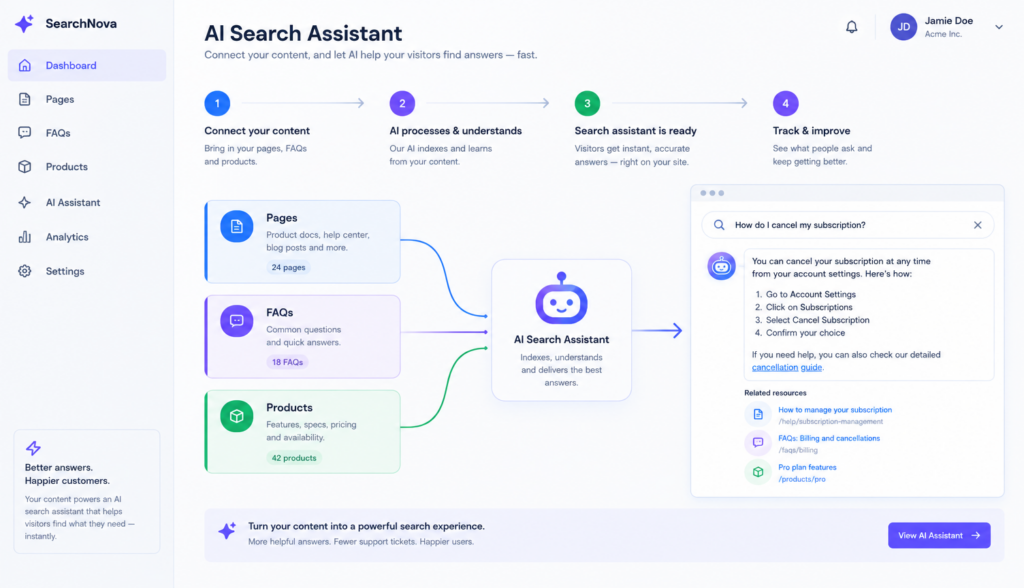
That is why many businesses are looking for ways to add AI search to website experiences. AI-powered search allows visitors to ask questions in natural language and receive useful answers based on approved company information. Instead of only returning a list of pages, an AI search assistant can understand the intent behind a question, find relevant content, and guide the visitor to the next step.
This article explains, in nontechnical terms, how AI search works, what information you should make available to it, and how to plan a smooth rollout for your business website.
## What AI Search Adds to a Website
AI search is different from a standard search box. A traditional search engine looks for matching words. If someone searches for “return policy,” it looks for pages that contain those exact words or close matches. That can work well for simple searches, but it often struggles with longer, more specific questions.
AI-powered search is designed to understand meaning, not just keywords. This is often called semantic search. For example, a visitor who asks “Can I send this back if it doesn’t fit?” may be looking for your return policy even though they never used the words “return policy.”
Natural-language search lets people ask questions the way they would ask a sales associate or support representative:
– “Which plan is best for a small team?”
– “Do you ship to Canada?”
– “Is this product safe for outdoor use?”
– “How do I reset my password?”
– “What’s included in the premium package?”
An AI assistant for your website can use your approved content to answer these questions directly, recommend relevant pages or products, and reduce the effort required for visitors to find what they need.
For business owners and website managers, the goal is not to add AI for its own sake. The goal is to help customers get accurate answers faster, support better buying decisions, and reduce frustration when information is hard to find.
## How to Add AI Search to Website Content
The first step is to identify the website content your AI search assistant should understand. Your public website is usually the foundation because it already contains information about your business, products, services, policies, and brand.
Useful website content may include:
– Homepage and key landing pages
– Product or service pages
– Category pages
– Pricing pages
– About and contact pages
– Shipping, returns, and warranty pages
– FAQ pages
– Blog posts and educational articles
– Support or help center pages
– Case studies and testimonials
– Location-specific pages
The AI assistant should be able to reference content that is accurate, current, and appropriate for customers to see. If your website has outdated pages, conflicting policies, or old product details, clean those up before relying on them for AI search.
Think of your website content as the assistant’s training library. The better organized and more complete that library is, the more helpful the AI search experience can be.
### Make Content Clear and Answer-Friendly
AI search can work with many types of content, but clear content is still important. If a page is vague, incomplete, or written only for internal teams, the assistant may have limited information to work with.
For example, a product page that says “available in multiple sizes” is less useful than one that lists the actual sizes. A service page that says “custom pricing available” may be accurate, but visitors may also need to know what factors affect the price, whether there is a minimum contract, or how to request a quote.
Before adding AI search, review important pages and ask:
– Does this page answer the questions customers commonly ask?
– Are policies stated clearly?
– Are product details specific and current?
– Are important details hidden in images or PDFs only?
– Are there conflicting answers on different pages?
AI search does not replace good content. It makes good content easier to access.
## Choose the Right Data Sources
Website pages are only one source of information. Depending on your business, your AI search assistant may need access to other approved data sources to provide complete answers.
Common data sources include:
– Product catalogs
– Inventory or availability feeds
– FAQ documents
– PDF brochures or manuals
– Setup guides and user documentation
– Knowledge base articles
– Shipping and return policies
– Pricing sheets
– Dealer or location information
– Internal Q&A documents approved for customer use
For ecommerce websites, product data is especially important. Customers often search by need, size, compatibility, material, color, price range, or use case. If that information is stored in product attributes or a catalog feed, your AI search tool should be able to reference it.
For service businesses, the assistant may need details about service areas, package options, scheduling requirements, industries served, and qualification criteria. For B2B companies, it may need product specifications, integration details, compliance information, or implementation timelines.
The key is to be intentional. Do not give an AI assistant access to every file your company has. Provide approved information that is useful for customers and safe to share.
### Decide What the Assistant Should Not Answer
It is just as important to define boundaries. Some topics should be handled by a human representative or directed to a specific process.
For example, the assistant may need to avoid:
– Legal, medical, or financial advice
– Custom quotes that require review
– Account-specific information unless securely integrated
– Internal policies not meant for customers
– Competitive claims that are not approved
– Guarantees your company does not officially make
A good AI search setup should make it clear when the assistant can answer, when it should link to a page, and when it should direct the visitor to contact your team.
## Understand RAG in Simple Terms
One of the most important concepts behind AI search is RAG, which stands for retrieval-augmented generation. The term sounds technical, but the business idea is straightforward.
A general-purpose AI tool generates answers based on broad training data and patterns. That can be useful for brainstorming, but it is not enough for answering specific questions about your company’s products, policies, and services.
RAG combines two steps:
1. **Retrieval:** The system searches your approved website content, documents, product data, or FAQs to find relevant information.
2. **Generation:** The AI uses that retrieved information to create a natural-language answer for the visitor.
In other words, RAG helps the assistant answer based on your business information rather than guessing.
For example, if a customer asks, “Can I return an opened item?” the assistant should retrieve your actual return policy and summarize the relevant answer. If your policy says opened items can only be returned within 30 days and must include original packaging, the assistant can explain that and link to the full policy page.
This approach is useful because it keeps the AI grounded in approved content. It also allows your team to update answers by updating the underlying content or connected data source.
## Plan the Setup Process
The setup process for AI search does not have to be overwhelming, but it should be planned carefully. A typical implementation includes several practical steps.
### 1. Define the Search Experience
Start by deciding what kind of experience you want visitors to have. AI search can appear in different ways, such as:
– A search bar with AI-generated answers
– A chatbot-style assistant
– A guided product finder
– A help center search assistant
– A support assistant on specific pages
– A sitewide assistant available from a chat icon
The right format depends on your website and customer needs. An ecommerce site may prioritize product discovery, while a software company may focus on support and documentation. A local service business may want the assistant to answer service area and scheduling questions.
### 2. Identify Priority Questions
List the questions your visitors ask most often. Sales, support, live chat, and customer service teams are excellent sources for this information.
Examples include:
– “How much does it cost?”
– “Which product is right for me?”
– “Do you offer installation?”
– “How long does shipping take?”
– “Can I cancel anytime?”
– “Do you work with companies in my industry?”
– “What is the difference between these two options?”
These questions help you decide what content and data the AI search assistant needs first. They also provide a useful checklist for testing.
### 3. Connect Approved Content and Data
Next, connect the sources the assistant should use. This may include crawling website pages, importing documents, connecting product feeds, or adding curated FAQs.
The goal is not simply to add more information. The goal is to add the right information in a structure the assistant can search and use effectively.
For example, if your website has 500 blog posts but only 20 are relevant to customer buying decisions, you may want to prioritize product pages, policies, and support content first. Additional content can be added later.
### 4. Configure Tone and Behavior
An AI assistant should sound helpful and professional, but it should also match your business. You may want it to answer briefly, suggest relevant links, ask clarifying questions, or recommend contacting a team member in certain situations.
Behavior rules may include:
– Use only approved company information
– Link to source pages when helpful
– Ask a follow-up question if the visitor’s request is unclear
– Avoid answering outside the company’s scope
– Recommend human support for complex or sensitive issues
– Do not invent pricing, availability, or guarantees
This is one area where a website-focused AI solution such as Chatbotbiz.ai differs from a general-purpose chatbot. The goal is not open-ended conversation; it is accurate, useful assistance based on the company’s own content.
## Test Before You Launch
Testing is one of the most important steps when you add AI search to website experiences. Before making it available to all visitors, test it with real questions and realistic scenarios.
Start with your priority question list. Ask the assistant the same questions customers ask your team. Then test variations:
– “What’s your return policy?”
– “Can I return something after I used it?”
– “How do returns work if the item doesn’t fit?”
– “Do I have to pay return shipping?”
The assistant should provide consistent, accurate answers based on your policy.
You should also test misspellings, casual language, and incomplete questions. Real users do not always type clean and precise searches. They may enter “ship canada,” “refund opened box,” or “best plan small business.” AI search should be able to interpret these questions better than a keyword-only search tool.
### Check for Accuracy and Source Quality
During testing, evaluate the assistant in several areas:
– **Accuracy:** Is the answer correct?
– **Completeness:** Does it include the key details the customer needs?
– **Clarity:** Is the answer easy to understand?
– **Relevance:** Did it use the right source material?
– **Boundaries:** Does it avoid answering questions it should not answer?
– **Next step:** Does it guide the visitor to a product, page, form, or contact option when appropriate?
If an answer is wrong or weak, the issue may not be the AI itself. The source content may be incomplete, outdated, or contradictory. Testing often reveals content gaps that were already affecting customers before AI search was added.
### Involve Different Teams
Invite team members from sales, support, marketing, ecommerce, and operations to test the assistant. Each group sees different customer questions and potential issues.
For example, support may notice a missing troubleshooting step. Sales may notice that the assistant does not explain product differences clearly. Marketing may identify tone issues. Ecommerce managers may catch missing product attributes.
AI search works best when it reflects the knowledge customers actually need, not just the structure of the website.
## Launch in a Controlled Way
Once testing is complete, plan the launch. You do not have to release AI search everywhere at once. A controlled rollout can help your team monitor performance and improve the experience.
Possible launch approaches include:
– Start on support or help pages
– Launch on product category pages first
– Make the assistant available only on high-intent pages
– Test with a percentage of visitors
– Begin with a limited set of approved topics
– Expand after reviewing early interactions
A phased launch helps reduce risk and gives your team time to refine answers. It also allows you to learn which questions visitors ask most often and where your content may need improvement.
### Monitor and Improve Over Time
Adding AI search is not a one-time website task. Your products, policies, pricing, and customer questions will change. The assistant should be reviewed and updated as your business changes.
After launch, monitor:
– Common questions
– Searches with no good answer
– Answers that need improvement
– Pages or products frequently recommended
– Topics that lead to human handoff
– Content gaps or outdated information
These insights can guide website improvements beyond the AI search tool itself. If visitors keep asking the same question, that may mean the answer should be easier to find on the page. If people ask about a product feature that is not listed, the product page may need an update.
AI search can help your team see what customers are looking for in their own words.
## What Information Should Be Made Available to the Assistant?
A practical way to prepare is to group your information into categories.
### Business Information
Include basic details customers may ask about:
– Company overview
– Locations
– Hours
– Contact options
– Service areas
– Appointment or consultation process
### Product or Service Information
Include the details people need to compare options and make decisions:
– Product descriptions
– Features and specifications
– Sizes, colors, materials, or compatibility
– Service packages
– Pricing details, if public
– Use cases
– Limitations or requirements
### Policies and Customer Support
Include information that reduces uncertainty:
– Shipping
– Returns and exchanges
– Warranty coverage
– Cancellation policy
– Payment options
– Support process
– Installation or setup instructions
### Educational Content
Include content that helps buyers understand their options:
– Buying guides
– Comparison articles
– Tutorials
– Case studies
– Industry-specific pages
– Blog posts that answer common questions
The most useful AI search assistants are built on information that is accurate, organized, and relevant to customer decisions.
## Conclusion
When you add AI search to website experiences, you are giving visitors a more natural way to find answers. Instead of forcing them to guess the right keyword or click through multiple pages, AI-powered search can interpret their question, retrieve approved information, and respond in plain language.
The most successful implementations start with strong website content, carefully selected data sources, a clear understanding of RAG, thoughtful setup, thorough testing, and a controlled launch. The technology matters, but the quality of the information behind it matters just as much.
For business websites, AI search should be practical: help customers get accurate answers, guide them to the right products or pages, and make the website easier to use. With the right preparation, it can become a helpful extension of your existing content and customer experience.