
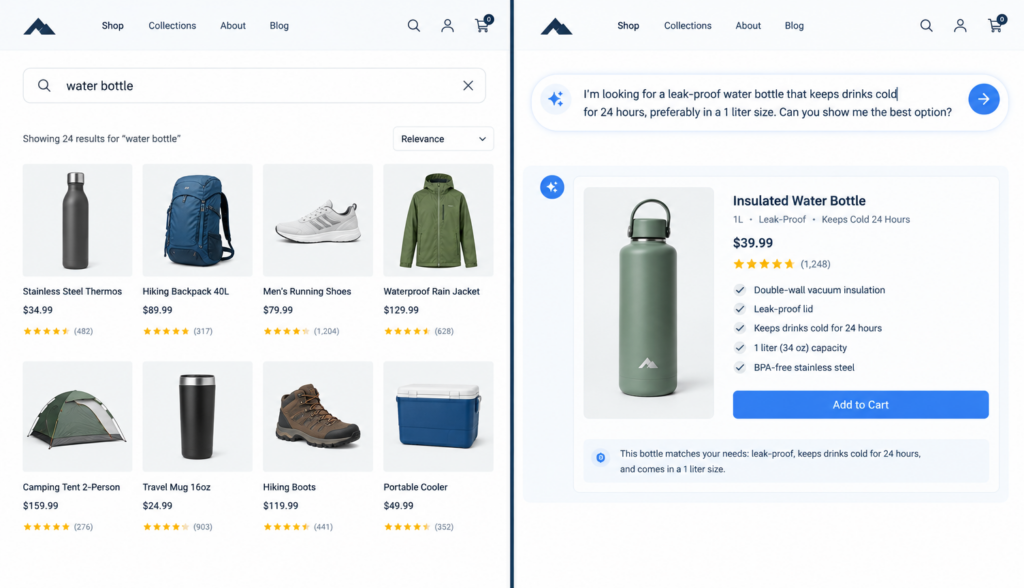
A visitor arrives on your website with a clear need, but they may not know what you call your products, services, categories, or features. They type “comfortable shoes for standing all day,” while your ecommerce site categorizes those products as “work footwear.” They search “how do I reset my invoice password,” while your support content says “billing portal credential recovery.” Traditional website search often struggles with that gap. AI website search is designed to close it by understanding what the visitor means, not just the exact words they type.
For business owners, ecommerce managers, marketers, and website teams, this difference matters. Site search is not just a convenience feature. It affects product discovery, customer support, lead generation, and conversion. When visitors cannot find what they need quickly, they often leave, contact support, or assume you do not offer what they want.
## Traditional Website Search: How Keyword Matching Works
Traditional website search is usually based on keyword matching. It looks for pages, products, or documents that contain the same words the visitor entered into the search box.
For example, if someone searches for “red running shoes,” a traditional search tool may look for content that includes:
– “Red”
– “Running”
– “Shoes”
If those words appear in a product title, category, description, tag, or page content, the system may return that item as a result.
This approach can work well when visitors use the exact terms your site uses. A customer who searches for “men’s waterproof jacket” may get useful results if your product catalog uses the same wording. A support visitor searching “return policy” will likely find your return policy page if that exact phrase appears in the title or content.
The challenge is that customers do not always search that way.
They may use:
– Casual language
– Misspellings
– Synonyms
– Questions
– Descriptions of a problem
– Industry terms different from yours
– Vague phrases such as “something for back pain” or “gift for new homeowner”
Traditional search often treats those searches literally. If the exact words are not present, the search may return irrelevant results or no results at all.
## The Limits of Keyword-Based Website Search
Keyword search is simple and predictable, but it has several limitations.
### It depends on exact wording
If your website calls a product “athletic footwear” and your customer searches for “gym shoes,” a basic keyword search may not make the connection. The products may be a perfect match, but the system does not understand that the words are related.
### It struggles with customer intent
A visitor searching “keep coffee hot on commute” may be looking for an insulated travel mug. Traditional search may not know that unless those exact words appear in the product description.
Similarly, a B2B buyer searching “software for tracking field technicians” may be interested in “workforce management,” “dispatch management,” or “field service management” solutions. If your site uses more formal terminology, the visitor may not find the right page.
### It can return too many irrelevant results
Keyword search may match pages that include one or more search terms without understanding context. A search for “apple charger” could return articles about charging, product pages with the word “apple” in a recipe blog, or unrelated accessories if the search rules are not carefully configured.
### It often creates zero-result searches
A zero-result search happens when a visitor searches for something and gets no results. Sometimes the business does offer the product or information, but the site search does not recognize the wording.
This is frustrating for users and costly for businesses. A no-results page can make visitors think:
– You do not carry what they need
– Your website is difficult to use
– They should search on Google instead
– A competitor may be easier to buy from
Zero-result searches are especially common when customers describe needs instead of using product names.
## What Is AI Website Search?
AI website search uses artificial intelligence to understand the meaning behind a visitor’s query. Instead of only matching exact keywords, it can interpret intent, identify related concepts, and return results based on what the visitor is likely trying to find.
For example, if someone searches:
“shoes I can wear all day at work”
An AI-powered search experience may understand that the visitor is probably looking for comfortable work shoes, supportive footwear, slip-resistant shoes, or products designed for long hours of standing.
The key difference is that AI website search can connect natural human language with your site’s structured and unstructured content, including:
– Product catalogs
– Service pages
– Blog posts
– Help articles
– FAQs
– PDFs and documents
– Policy pages
– Technical resources
Instead of forcing customers to learn your terminology, AI search helps your website respond to theirs.
## Semantic Search: Understanding Meaning, Not Just Words
Semantic search is one of the main ideas behind AI-powered site search. “Semantic” refers to meaning. A semantic search system looks at the meaning of a query and the meaning of your content to find the best match.
In traditional search, “sofa” and “couch” may be treated as different words. In semantic search, the system can recognize that they refer to the same type of product.
Here are a few examples:
| Customer searches | Website terminology | AI search can connect them |
|—|—|—|
| “couch for small apartment” | Compact sofa | Yes |
| “help with password” | Account recovery | Yes |
| “waterproof coat” | Rain jacket | Yes |
| “dog food for sensitive stomach” | Digestive care formula | Yes |
| “software for customer messages” | Customer communication platform | Yes |
This is especially helpful for businesses with large catalogs, specialized terminology, or technical products. Your internal naming conventions may be accurate, but they may not match how customers describe their needs.
Semantic search helps bridge that language gap.
## Natural-Language Search: Letting Visitors Ask Like Humans
Traditional website search often encourages people to type short keyword phrases, such as:
– “Shipping”
– “Blue dress”
– “Pricing”
– “Warranty”
AI website search supports natural-language search, which means visitors can ask questions or describe what they need in a more conversational way.
For example:
– “What size backpack fits under an airplane seat?”
– “Do you have a jacket that works for winter hiking?”
– “How much does installation cost?”
– “Can I return an opened product?”
– “Which plan is best for a small business with five employees?”
– “I need a gift for someone who likes cooking but already has knives.”
This matters because many customers do not think in keywords. They think in problems, goals, and questions.
Natural-language search is particularly useful when the visitor is early in the buying process. They may not know the exact product name yet. They may only know the outcome they want.
For example, an ecommerce customer may not search for “ergonomic lumbar support office chair.” They may search:
“My back hurts after sitting at my desk all day.”
A more intelligent site search can understand that this query may relate to ergonomic chairs, lumbar support cushions, standing desks, or educational content about workspace setup.
## Questions vs. Keywords: A Major Difference in User Behavior
Many websites still treat search as a place for keywords. But customers increasingly use website search the way they use search engines or AI assistants: they ask full questions.
That creates a difference between keyword-based systems and AI-powered systems.
A keyword search tool may handle:
“refund policy”
But it may struggle with:
“Can I get my money back if I used the product once?”
A keyword search tool may handle:
“installation guide”
But it may struggle with:
“How do I install this if I don’t have a professional technician?”
A keyword search tool may handle:
“business plan pricing”
But it may struggle with:
“Which subscription should I choose for a team of 12?”
AI website search is better suited for question-based behavior because it can interpret the complete query. It can look for meaning across multiple parts of a sentence, not just isolate a few keywords.
For businesses, this means your website can serve more visitors without requiring them to navigate through menus, filters, category pages, and support archives.
## How AI Search Reduces Zero-Result Searches
Zero-result searches are one of the clearest signs that a website search experience is not meeting customer expectations. They happen for many reasons:
– The visitor used a synonym your site does not recognize
– The query included a typo
– The content exists but is labeled differently
– The search was phrased as a question
– The product is in an unexpected category
– The visitor described a use case rather than a product
AI search can reduce these dead ends by broadening how the system understands relevance.
For instance, a traditional search for “sneakers for nurses” may return nothing if your site does not use that phrase. AI search may connect the query to “slip-resistant work shoes,” “all-day comfort footwear,” or “healthcare work shoes,” depending on your product content.
That does not mean AI search should show random results. Good AI site search should still be grounded in your approved website content and product data. The goal is not to guess wildly. The goal is to recognize the visitor’s intent and match it to relevant information you actually provide.
## Where RAG Fits Into AI Website Search
You may hear the term RAG when discussing AI search. RAG stands for retrieval-augmented generation. The phrase sounds technical, but the business concept is straightforward.
A general-purpose AI tool may answer from broad training data. That can be risky for a business website because you do not want it inventing policies, prices, product details, or service capabilities.
RAG works differently. It first retrieves relevant information from approved sources, such as your website, product database, FAQs, documents, or knowledge base. Then it uses that information to generate a helpful answer.
In simple terms:
1. The visitor asks a question.
2. The system searches your approved business content.
3. It finds the most relevant information.
4. It responds in natural language, often with links to the source pages or products.
For website search, this approach is important because accuracy and control matter. Customers need useful answers, but businesses also need those answers to reflect current, approved information.
This is one reason tools built specifically for business websites, such as Chatbotbiz.ai, are different from general-purpose chatbots. They are designed to work with a company’s own website content, product information, FAQs, and documents rather than acting as a broad, open-ended AI assistant.
## Conversion Implications: Why Better Search Affects Revenue
Website search has a direct connection to conversion because it captures high-intent behavior. A visitor who uses search is actively looking for something. They may be closer to buying, booking, requesting a quote, or contacting your team than someone casually browsing.
When search works well, it can help visitors:
– Find the right product faster
– Compare options more easily
– Understand policies before buying
– Get confidence in a purchase decision
– Discover relevant services or content
– Avoid unnecessary support requests
When search fails, it can create friction at critical moments.
### Product discovery improves
AI website search can help customers find products even when they do not know the official product name. This is especially valuable for ecommerce stores with large catalogs, technical items, seasonal products, or many variations.
For example, a customer may search “shirt for hot weather that does not wrinkle.” AI search may connect that query to lightweight travel shirts, moisture-wicking fabrics, or wrinkle-resistant collections.
### Buyers get answers at decision points
Many conversions stall because visitors have unanswered questions. They may wonder about sizing, compatibility, shipping, implementation, warranties, returns, or pricing.
Traditional site search may send them to a list of pages. AI search can often provide a direct answer based on approved content and then guide the visitor to the relevant page, product, or next step.
### Support demand can decrease
If customers can find answers on your website, they may not need to call, email, or open a ticket. This is especially useful for repetitive questions such as:
– “Where is my order?”
– “What is your return window?”
– “Do you ship internationally?”
– “How do I reset my password?”
– “Is this product compatible with my device?”
AI-powered search and chat experiences can help customers self-serve while still escalating to human support when needed.
### Visitors stay engaged longer
Poor search results often end the session. Relevant results invite the visitor to keep exploring. For marketers and website managers, this can support better engagement with product pages, educational content, and lead-generation paths.
## Traditional Search Still Has a Place
AI search is not always a replacement for every traditional search function. In some cases, keyword search is useful and efficient.
For example, traditional keyword search works well when visitors search for:
– Exact product SKUs
– Part numbers
– Model names
– Order numbers
– Known document titles
– Specific brand names
The best site search experiences may combine both approaches. Keyword matching can handle exact lookups, while AI and semantic search can help with broader, more conversational, or intent-based queries.
The question is not always “traditional search or AI search?” Often, the better question is: “How can our website help visitors find what they mean, even when they do not use our exact words?”
## What to Look for in an AI Website Search Solution
If you are evaluating AI website search for your business, focus on practical capabilities rather than buzzwords.
Look for a solution that can:
– Understand natural-language questions
– Search across website pages, product data, FAQs, and documents
– Use your approved business information as the source of answers
– Return relevant links, products, or pages
– Handle synonyms and related concepts
– Reduce zero-result searches
– Keep answers aligned with your actual policies and offerings
– Work for both customer support and product discovery
– Provide a user experience that fits naturally on your website
For many businesses, the goal is not to add AI for its own sake. The goal is to make the website more helpful, easier to search, and better at guiding visitors to the right outcome.
## Conclusion: AI Website Search Helps Customers Search Their Way
Traditional website search depends heavily on exact keywords. It can work well when visitors know the right terms, but it often fails when people ask questions, use synonyms, describe problems, or search in everyday language.
AI website search takes a more flexible approach. By using semantic search, natural-language understanding, and approved business content, it can connect customer intent with the most relevant products, pages, policies, and answers.
For businesses, that means fewer dead ends, better product discovery, more helpful self-service, and a smoother path from question to conversion. For customers, it means they can simply describe what they need without having to learn your company’s exact terminology first.