
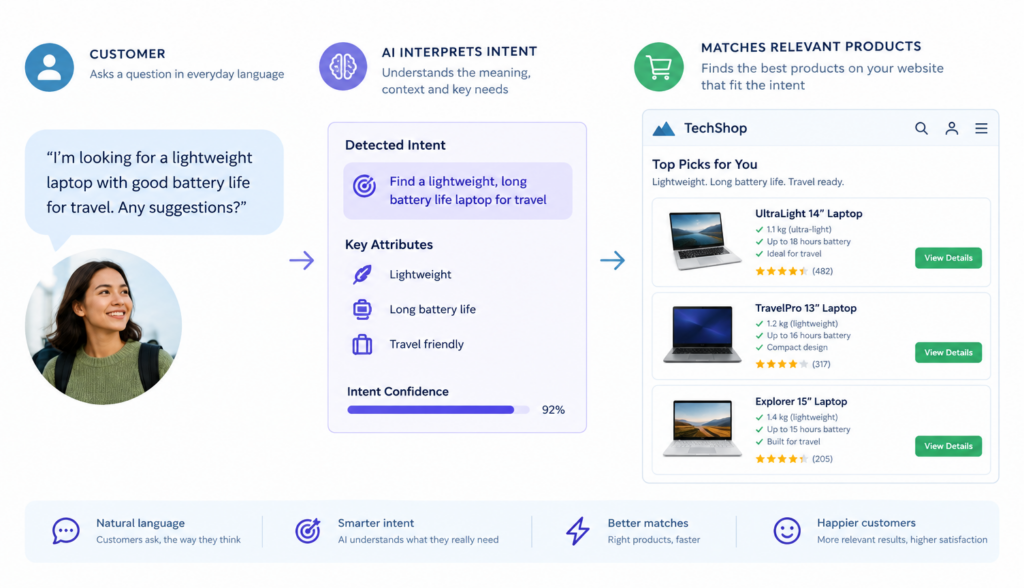
A visitor lands on your website with a question. They type a few words into your search box, but those words do not exactly match the way your content, product names, or help articles are written. The result? They see irrelevant results, no results, or a long list of pages they have to sort through themselves. That is where understanding search intent matters. Instead of looking only at the exact words someone typed, modern AI-powered website search can interpret what the visitor is trying to accomplish and guide them to the most useful answer, product, or next step.
For many business websites, the search box is still treated like a simple keyword-matching tool. If a visitor types “shipping time,” the website may only return pages that contain those exact words. But what if your policy page says “delivery estimates”? What if a customer types “will this arrive before Friday?” or “how long does ground delivery take?” A traditional search tool may miss the connection. A smarter search experience can recognize that these phrases are all related to the same customer need.
That shift from matching words to understanding meaning is the heart of semantic search.
## Keywords vs. Search Intent: What Is the Difference?
Traditional website search is built around keywords. It checks the query, looks for pages or products containing the same terms, and ranks results based on matching signals. This can work well when visitors use the exact language your website uses.
For example, if your site sells “waterproof hiking boots” and a customer searches for “waterproof hiking boots,” keyword search will likely perform well. The words line up neatly.
But customer searches are rarely that predictable. People often search based on a problem, use case, symptom, preference, or question. They may not know your product names or internal terminology.
A customer might search:
– “boots for wet trails”
– “shoes for hiking in rain”
– “do these keep feet dry?”
– “best boot for muddy conditions”
– “ankle support waterproof walking shoe”
All of these searches could point to the same general intent: the visitor wants footwear suitable for wet hiking conditions. A basic keyword search may treat these as separate and unrelated. A search system that understands search intent can see the connection.
Search intent is the purpose behind a query. On a business website, that intent usually falls into a few common categories:
– The visitor wants to find a specific product or service.
– The visitor wants to compare options.
– The visitor needs help choosing the right solution.
– The visitor has a support or policy question.
– The visitor is looking for instructions, documentation, or specifications.
– The visitor is trying to solve a problem but does not know the exact terminology.
When your website search understands intent, it can give visitors results based on what they mean, not just what they type.
## How Semantic Search Helps Websites Understand Meaning
Semantic search is a search approach that focuses on meaning and context instead of exact keyword matching alone. It uses natural-language processing and AI to understand relationships between words, concepts, and user questions.
In simple terms, semantic search helps a website recognize that different phrases can mean similar things.
For example:
– “Return policy” and “Can I send this back?” may refer to the same policy.
– “Pricing,” “cost,” and “how much does it run?” may all relate to buying information.
– “Login problem,” “can’t access my account,” and “password not working” may all point to account support.
– “Small business CRM” and “software for managing customer follow-up” may refer to the same category of solution.
This matters because customers do not always search the way businesses write. Your internal product names, service categories, and documentation labels may be clear to your team, but unfamiliar to a first-time visitor.
Semantic search closes that gap.
It can also improve discovery. A visitor may type a broad or conversational question, and the search system can connect that question to the most relevant page, product, FAQ, or document—even if the exact wording does not appear on the page.
This does not mean keywords no longer matter. Keywords still help describe content and signal relevance. But semantic search adds a deeper layer by interpreting the meaning behind those keywords.
## Context Turns a Search Query Into a Better Answer
A single search term can have different meanings depending on context. That is one reason exact-match search often struggles.
Take the word “installation.” On one website, it might refer to installing software. On another, it might mean installing flooring, appliances, solar panels, or security systems. Even within the same website, it could refer to several different products or services.
Context helps narrow the meaning.
An AI-powered search system may consider signals such as:
– The page the visitor is currently viewing
– The product category they are browsing
– Previous search terms during the same session
– The structure of your website content
– Product descriptions and specifications
– FAQs, help articles, and documentation
– Synonyms and related terms
– The full wording of the visitor’s question
For example, if someone is looking at a product page for an outdoor camera and types “how do I install it,” the likely intent is not general installation information. They probably want installation instructions for that specific camera.
If the same visitor is on a pricing page and searches “setup fee,” they are probably asking whether there is an additional charge to get started.
Context changes the answer.
This is especially useful for websites with large product catalogs, technical documentation, service pages, or detailed support content. The more information your website contains, the harder it can be for visitors to locate the one answer that applies to their situation. Search that understands context can help reduce that friction.
## Natural-Language Search Matches How Customers Actually Ask Questions
Most people do not think in database fields. They ask questions in plain language.
They type things like:
– “Which plan is best for a team of 10?”
– “Can this be used outdoors?”
– “Do you offer bulk pricing?”
– “What size should I buy?”
– “Is this compatible with my existing system?”
– “How soon can I get it delivered?”
– “What happens if I cancel?”
A traditional search box may break these questions into individual keywords and return pages that contain some of those words. That approach may miss the actual question.
Natural-language search is designed to handle more conversational queries. Instead of forcing customers to simplify their thoughts into one or two keywords, it lets them ask questions the way they would ask a salesperson, support agent, or product expert.
For business websites, this can make search feel less like a technical tool and more like guided assistance.
A visitor who asks “What size should I buy for a 40-pound dog?” does not want every page containing “size,” “buy,” and “dog.” They want a recommendation or sizing guidance. If your website has a size chart, product guide, or FAQ that answers the question, intelligent site search can point them there.
The same applies to B2B websites. A buyer might ask, “Does this integrate with Salesforce?” or “What’s the difference between the standard and professional plan?” If that information exists in your approved content, AI-powered search can help surface it quickly.
## Customer Questions Are Often More Valuable Than Keywords
Website search data can be a valuable source of customer insight. It shows what visitors are trying to find, what language they use, and where your content may be unclear.
But if your search tool only tracks keywords, you may miss the bigger picture.
For example, these searches may appear different in a keyword report:
– “refund”
– “money back”
– “cancel order”
– “return item”
– “wrong size”
– “exchange policy”
Individually, they look like separate topics. When viewed through the lens of search intent, they may all relate to post-purchase confidence and return expectations.
That insight can help you improve your website. You might decide to make your return policy easier to find, add clearer product sizing information, or include return details on product pages.
Understanding customer questions can also help marketing and sales teams. If visitors repeatedly search for compatibility, pricing, setup time, warranty details, or product comparisons, those topics may deserve stronger placement in your content.
In ecommerce, customer questions often reveal purchase hesitation. A visitor may be interested in buying but needs one concern addressed first. If search helps answer that concern quickly, it supports a smoother buying journey.
On service-based websites, questions can reveal confusion about process, timeline, qualifications, service areas, or pricing models. Each search is a clue about what customers need before they are ready to take action.
## Product Matching Improves When Search Understands Intent
Product search is one of the clearest examples of why intent matters.
A customer may not know your exact product name, SKU, model number, or category structure. They may search based on what they need the product to do.
For example:
– “gift for new homeowner”
– “laptop bag that fits under airplane seat”
– “cleaner safe for marble”
– “replacement filter for model 2200”
– “warm jacket for skiing”
– “chair for small apartment”
– “software for appointment reminders”
Keyword search may struggle if those exact phrases do not appear in your product titles. Semantic search can connect the customer’s description to relevant products based on product attributes, descriptions, categories, specifications, and related content.
This can be especially useful when shoppers search by:
– Use case
– Problem to solve
– Material or feature
– Compatibility
– Size or fit
– Budget or price range
– Occasion
– Industry
– Skill level
– Desired outcome
For instance, a shopper who searches “easy camera for beginners” may not care which model has the most advanced features. They want something simple to set up and use. A search system that understands intent can prioritize products described as beginner-friendly, easy to install, or simple to operate.
Similarly, a B2B buyer searching for “software for managing customer questions on our website” may be looking for a chatbot, intelligent site search, knowledge base assistant, or support automation tool. They may not use the vendor’s preferred category name. Intent-aware search can help connect their wording to the right solution.
Better product matching does not mean guessing. It means using the information already available on your website—product descriptions, FAQs, guides, manuals, and approved business content—to make more useful connections.
## Where AI and RAG Fit Into Website Search
AI can help website search understand natural language, compare meanings, and generate helpful responses. But for business websites, it is important that AI uses reliable, approved information.
That is where retrieval-augmented generation, often shortened to RAG, comes in.
In simple business terms, RAG is a way for an AI assistant to look up relevant information from your own content before answering a question. Instead of relying only on general knowledge, the system retrieves information from approved sources such as:
– Website pages
– Product catalogs
– FAQs
– Help articles
– Policy pages
– PDF documents
– Internal knowledge bases
– Service descriptions
Then it uses that retrieved information to provide an answer or recommend a relevant page.
This is important because business website visitors usually need specific answers, not generic ones. They want to know your shipping policy, your service areas, your product compatibility details, your pricing explanation, or your warranty terms.
A general-purpose AI tool may not know that information. An AI assistant built for your website can work from your content and guide visitors using the information you choose to provide.
That is the role of solutions like Chatbotbiz.ai: combining AI-powered chat assistance with intelligent site search so visitors can ask natural-language questions and receive answers based on the company’s own website content, product information, FAQs, documents, and other approved sources.
## What Changes When Website Search Understands Intent?
When search moves beyond exact keywords, the visitor experience changes in practical ways.
### Visitors find answers faster
Instead of trying several different search terms, visitors can ask their question naturally. The system can connect them to relevant information even if their wording differs from your website copy.
### Fewer searches end in dead ends
“No results found” often happens because of language mismatch, not because your website lacks the answer. Semantic search can reduce those mismatches by recognizing synonyms, related phrases, and similar meanings.
### Customers get more relevant product results
Intent-aware product matching helps shoppers find items based on use case, need, or preference. This is especially helpful for large catalogs or products with detailed specifications.
### Support content becomes easier to use
If your website contains FAQs, guides, manuals, or troubleshooting content, AI-powered search can make that information more accessible. Customers do not need to know the exact title of a help article to find it.
### Content gaps become easier to spot
Searches that cannot be answered may reveal missing content. If visitors often ask about a topic your site does not cover, that is a useful signal for future pages, FAQs, product details, or documentation.
### The website feels more helpful
A good search experience can feel like a knowledgeable assistant. It helps visitors move from question to answer without making them navigate your entire site structure.
## Keeping Intent-Based Search Accurate and Useful
While semantic search offers clear benefits, it works best when supported by strong website content. AI cannot reliably answer business-specific questions if the source information is missing, outdated, or unclear.
To support better search results, businesses should:
– Keep product descriptions complete and consistent.
– Write FAQs in the language customers actually use.
– Make policies clear and easy to understand.
– Add comparison content where buyers need help choosing.
– Include compatibility, sizing, setup, and service details.
– Update outdated pages and documents.
– Organize content around customer questions, not only internal categories.
It also helps to review search activity regularly. Look for unanswered questions, confusing terms, repeated concerns, and searches that suggest buying hesitation. These insights can guide better content and improve the overall customer experience.
AI-powered search should not be treated as a replacement for clear content. It works best as a layer that helps visitors access that content more naturally.
## Conclusion: Search Intent Makes Website Search More Human
When website search understands search intent, it becomes more than a box that matches words. It becomes a guide that helps visitors express what they need in their own language and find relevant answers, products, or resources faster.
Semantic search makes this possible by focusing on meaning, context, and relationships between ideas. It helps bridge the gap between how businesses organize information and how customers actually ask questions.
For business owners, ecommerce teams, marketers, and website managers, the takeaway is simple: your visitors should not have to guess the exact words your website uses. If the answer or product exists on your site, intelligent search should help them find it.
AI-powered tools such as Chatbotbiz.ai can support this shift by using approved website content, product information, FAQs, and documents to answer natural-language questions and improve site search. The result is a website experience that feels clearer, more responsive, and better aligned with what customers are trying to do.