
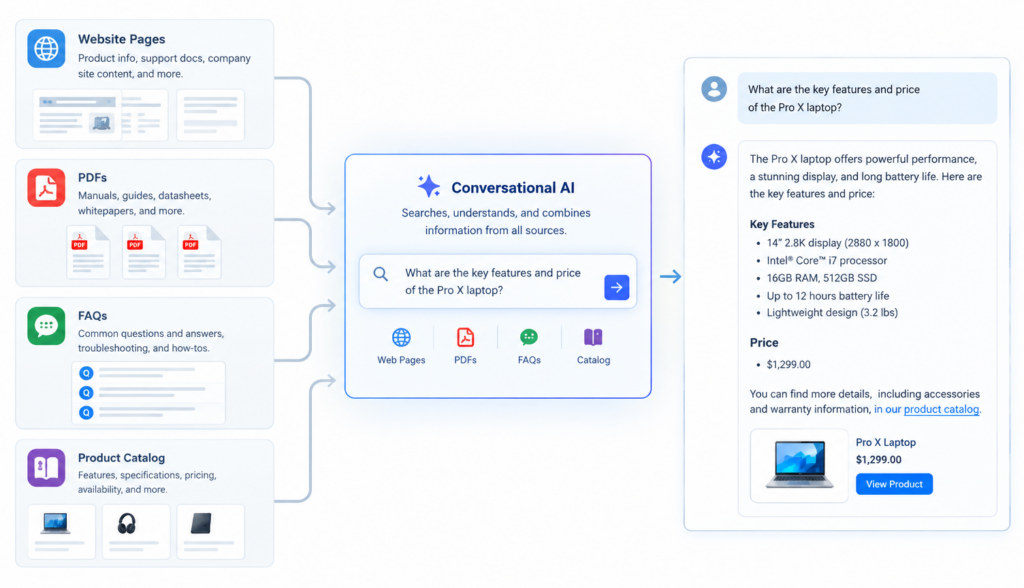
Visitors rarely think about your website the way your business does. You may organize information by departments, product categories, PDF libraries, FAQ pages, support sections, and blog posts. Your customers simply want an answer: “Will this work with my system?” “What is your return policy?” “Do you have this product in blue?” “Where can I download the warranty document?” AI website content search helps close that gap by letting people ask questions in natural language and receive answers from the information your business has already approved.
The challenge is not that businesses lack information. Most websites have plenty of it. The problem is that the information is often spread across many locations: web pages, FAQs, ecommerce data, user guides, spec sheets, help articles, and internal documents. A traditional search box may return a list of links, but the visitor still has to click, scan, compare, and interpret. That creates friction, especially when someone is close to making a purchase or needs support quickly.
This is where RAG search comes in. RAG stands for retrieval-augmented generation. In simple terms, it means an AI assistant first retrieves relevant information from approved sources, then uses that information to generate a helpful answer. Instead of guessing or relying only on general knowledge, it grounds the response in your website content, product information, FAQs, and documents.
## Why Website Search Often Falls Short
Most business websites are built around structure. There is a navigation menu, product categories, landing pages, a search bar, and maybe a help center. That structure makes sense to the company, but it does not always match how customers ask questions.
A visitor might search for:
– “Can I use this outdoors?”
– “Do you ship to Canada?”
– “Which plan includes reporting?”
– “Does this fit a 2019 Honda Accord?”
– “What is the difference between these two models?”
– “Where is the safety data sheet?”
If your search tool relies mostly on exact keyword matching, it may miss the intent behind the question. For example, a customer searching “outdoor use” might need a page that says “weather-resistant,” “UV-rated,” or “suitable for exterior installation.” The words are different, but the meaning is related.
Traditional site search can also struggle when the answer is located in a PDF, buried in a product description, or split across multiple pages. Visitors may get too many results, no results, or results that technically match the words but do not answer the question.
AI website content search is designed to understand the meaning behind a question and retrieve information from multiple approved business sources, even when the visitor does not know where that information is stored.
## What RAG Search Means in Plain English
RAG search combines two important functions: retrieval and answer generation.
First, the system retrieves relevant content from your business sources. These sources might include website pages, FAQs, product data, downloadable documents, help articles, or other approved content. The AI looks for information that is semantically related to the visitor’s question, not just exact keyword matches.
Second, the AI uses the retrieved information to generate a natural-language answer. The goal is to provide a direct, useful response based on your company’s actual content.
A simple example:
A customer asks, “Can I return a product after opening the box?”
A RAG-powered search experience might retrieve information from:
– Your returns policy page
– An FAQ about opened items
– A product-specific policy note
– A customer service document covering exceptions
Then it can answer in plain language, such as:
“Opened items may be returned within 30 days if they are unused and in original packaging. Some product categories are excluded. Please check the return policy for details or contact support if your item is damaged or defective.”
The important point is that the answer is based on available business content rather than a generic response. For companies, that distinction matters. Customers need helpful answers, but those answers also need to be accurate, consistent, and aligned with approved information.
## AI Website Content Search Across Website Pages
Your website pages are often the foundation of your customer-facing information. They explain your services, policies, locations, pricing, process, industries served, and company details. But as websites grow, information can become harder to find.
A visitor might not know whether an answer is on a service page, a pricing page, an “About” page, or a support page. AI website content search can help by treating your website content as a searchable knowledge source.
For example, imagine a B2B service company with pages for implementation, onboarding, integrations, security, and pricing. A prospect asks, “How long does setup take?” The answer might be mentioned on the onboarding page, while related details appear on the implementation page. A RAG search experience can retrieve the relevant sections and provide a concise answer, along with a link to the underlying page if needed.
This improves the visitor experience in several ways:
– Visitors can ask questions in their own words.
– They do not need to understand your site structure.
– They can get direct answers instead of scanning multiple pages.
– They can be guided to relevant next steps, such as contacting sales or reading a detailed page.
For website managers, this also helps make existing content more useful. A page that is buried three levels deep in navigation can still answer a customer’s question when connected to intelligent search.
## Searching FAQs Without Forcing Visitors to Browse Them
FAQ pages are helpful, but they often become long and hard to navigate. Businesses keep adding questions over time, and visitors may have to scroll through dozens of entries to find the one that applies.
AI can make FAQ content more accessible by allowing customers to ask the question naturally. The system can retrieve the closest approved answer even if the wording is different.
For example, your FAQ might say:
“Orders typically ship within two business days.”
A visitor might ask:
– “When will my order go out?”
– “How fast do you ship?”
– “Do you ship the same day?”
– “How long before my package leaves the warehouse?”
Traditional search may not connect all of those questions to the same FAQ entry. Semantic search can understand that they relate to shipping timing.
This is especially useful for common customer service questions, such as:
– Shipping and delivery
– Returns and exchanges
– Product compatibility
– Warranty coverage
– Account setup
– Billing
– Appointment scheduling
– Installation requirements
When visitors can get quick answers from FAQ content, they are less likely to abandon the site or contact support for routine questions. That does not replace the need for human support, but it can reduce friction for simple information requests.
## Searching Product Data for Ecommerce and Catalog Websites
For ecommerce websites and product catalogs, search quality can directly affect the buying experience. Customers often arrive with specific needs, but they may not know your exact product names, category labels, or filter structure.
A standard product search might work well for simple queries like “black backpack” or “replacement filter.” But buyers often ask more detailed questions:
– “Which laptop stand works with a 17-inch computer?”
– “Do you have a waterproof jacket for hiking?”
– “What replacement part fits model X200?”
– “Which products are gluten-free?”
– “Is this available in bulk?”
– “What is the difference between the standard and pro version?”
To answer these questions, AI search may need to retrieve information from multiple product fields, such as:
– Product titles
– Descriptions
– Specifications
– Attributes
– Categories
– Inventory status
– Compatibility notes
– Pricing or package details
– Shipping restrictions
– Customer-facing product documents
RAG search can help by connecting a customer’s question to structured and unstructured product information. Structured data includes fields like size, color, SKU, price, and stock status. Unstructured data includes descriptions, guides, and explanatory content.
For example, if a customer asks, “Which air purifier is best for a large bedroom?” AI website content search can retrieve products with room-size specifications, compare relevant attributes, and summarize suitable options based on the available catalog data.
The goal is not just to return a product list. It is to help the customer make sense of the options. That may include explaining differences, identifying compatible accessories, or pointing out important limitations clearly.
## Searching Documents, PDFs, Manuals, and Guides
Many businesses store critical information in documents rather than standard web pages. These may include:
– Product manuals
– Installation guides
– Warranty documents
– Safety data sheets
– Technical specifications
– Policy documents
– Training materials
– Service guides
– Compliance documents
– Brochures and catalogs
The problem is that documents are often difficult for visitors to search. A customer may need one paragraph from a 40-page PDF, but a traditional website search may only point to the file. The visitor still has to open it, search inside it, and interpret the result.
AI-powered document search can retrieve relevant passages from approved documents and present the answer in a more usable format. For example, a visitor might ask, “What temperature range does this product support?” The answer may be inside a technical PDF. A RAG search system can locate the relevant section and summarize it, while ideally providing a link or reference to the source document.
This is especially valuable for companies with complex products, regulated information, or detailed support materials. It helps customers access the information they need without requiring them to understand which document contains it.
However, document search should be handled carefully. Businesses should decide which documents are approved for AI retrieval, keep them current, and avoid including outdated or internal-only materials unless the system is designed for authenticated internal use.
## How Retrieval Works Behind the Scenes
Although the technology can be sophisticated, the business concept is straightforward. Retrieval is the process of finding the most relevant pieces of content before the AI writes an answer.
Here is a simplified version of how it works:
1. **Content is collected from approved sources.** This may include web pages, FAQs, product data, and documents.
2. **The content is processed into searchable sections.** Long pages and documents may be broken into smaller chunks so the system can find specific answers.
3. **The system represents meaning, not just keywords.** Semantic search helps connect related ideas even when the words differ.
4. **A visitor asks a question in natural language.** The question might be typed into a chatbot, AI search box, or website assistant.
5. **The system retrieves relevant content.** It searches across approved sources for the best supporting information.
6. **The AI generates an answer.** The response is based on the retrieved content, often with links to source pages or documents.
This retrieval step is what separates a business-focused AI search experience from a general-purpose chatbot. A general AI model may answer based on broad training data. A RAG search system for your website should answer based on your business information.
That difference is important for accuracy, trust, and consistency. If a customer asks about your return window, product compatibility, or service process, the answer should come from your policies and content, not from a general assumption.
## Turning Retrieved Information Into Useful Answers
Retrieving the right information is only part of the experience. The answer also needs to be clear, concise, and appropriate for the customer’s intent.
A strong AI-generated answer should:
– Directly address the question
– Use plain language
– Avoid unnecessary technical detail
– Reflect the content that was retrieved
– Mention limitations or exceptions when relevant
– Provide links or next steps when useful
– Avoid making claims that are not supported by the source content
For example, if a visitor asks, “Do you offer installation?” and your website says installation is available only in certain regions, the answer should not simply say, “Yes.” A better answer would be:
“Yes, installation is available in select service areas. Availability depends on your location. You can check service coverage on the installation page or contact the team with your ZIP code.”
That answer is more helpful because it includes the condition that matters.
For ecommerce, useful answers may include product recommendations, comparisons, or compatibility guidance. For service businesses, answers may explain processes, eligibility, pricing factors, or booking steps. For support sites, answers may summarize troubleshooting instructions and direct users to the relevant guide.
The key is that the AI should not only find information. It should present it in a way that helps the visitor take the next step.
## Why Approved Sources Matter
One of the most important parts of AI website content search is controlling the information the AI can use. Business answers should come from approved, current, and accurate sources.
Approved sources may include:
– Public website pages
– Official FAQs
– Product catalog data
– Help center articles
– Policy pages
– Selected PDFs
– Knowledge base content
– Other business-approved documents
This approach helps reduce the risk of inconsistent messaging. If support policies, pricing details, warranty information, or product specifications are outdated, the AI may retrieve outdated information. That is why content governance still matters.
Businesses should regularly review:
– Whether important pages are up to date
– Whether old PDFs should be removed or replaced
– Whether product data is complete and accurate
– Whether FAQ answers match current policies
– Whether the AI search experience points to the right sources
RAG can make information easier to access, but it does not eliminate the need for good content management. The better your source content, the better the search experience can be.
## Practical Use Cases for Business Websites
AI search can be useful across many types of websites. Here are a few practical examples.
### Ecommerce Stores
An online retailer can let shoppers ask questions such as, “Which running shoes are good for flat feet?” or “Does this jacket have an inside pocket?” The AI can search product descriptions, specifications, and buying guides to provide helpful answers.
### B2B Companies
A software or service company can help prospects understand plans, features, integrations, security requirements, and onboarding steps. Instead of forcing visitors to read several pages, the system can summarize relevant information from approved content.
### Manufacturers and Distributors
Companies with large catalogs, technical specs, and product documentation can help customers find compatible parts, compare models, or access manuals faster.
### Healthcare, Legal, or Financial Service Websites
For businesses in sensitive industries, AI search can help visitors find published information while staying grounded in approved website content. In these cases, careful disclaimers, source control, and compliance review are especially important.
### Local Service Businesses
A local company can answer questions about service areas, scheduling, pricing factors, warranties, and preparation steps. Visitors can get practical information without calling for every basic question.
## How Chatbotbiz.ai Fits Into the Search Experience
Chatbotbiz.ai is designed for business websites that want an AI assistant and intelligent site search based on their own content. Rather than acting like a general-purpose chatbot, it works with approved business sources such as website content, product information, FAQs, and documents.
That distinction matters because website visitors are usually not looking for a broad AI conversation. They want accurate answers about your company, your products, your services, and your policies. A business-focused AI search experience can help them reach those answers faster while keeping the response connected to your source material.
For website managers, this can support both customer experience and conversion goals. When visitors can quickly find answers, they are more likely to continue evaluating products, complete forms, contact sales, book appointments, or move forward with a purchase.
## Getting Started With AI Website Content Search
Before adding AI search to a business website, it helps to review your content sources and customer questions.
Start by identifying:
– The questions customers ask most often
– The pages that contain important buying or support information
– The FAQs that should be searchable
– The product data fields that matter for decision-making
– The documents customers need most often
– The information that should not be used by the AI
– The content that may be outdated or duplicated
Next, think about the user experience. Will visitors ask questions through a chat interface, an intelligent search bar, a product assistant, or all of the above? Should answers include links to source pages? Should the experience support product discovery, customer support, lead generation, or all three?
These decisions shape how the AI search experience should be configured. The technology is important, but the strategy starts with understanding what your visitors are trying to find.
## Conclusion
Customers should not have to know whether an answer lives on a website page, FAQ entry, product record, PDF, or support document. They should be able to ask a clear question and receive a clear answer based on your approved business information.
AI website content search makes that possible by using RAG search to retrieve relevant content from multiple sources and turn it into natural-language answers. For businesses, this can make existing content more accessible, reduce friction in the buying process, and help visitors find accurate information faster.
The best results come from combining strong source content, thoughtful retrieval, and clear answer generation. When those pieces work together, your website becomes easier to use—not because visitors learn your structure, but because your site understands their questions.