
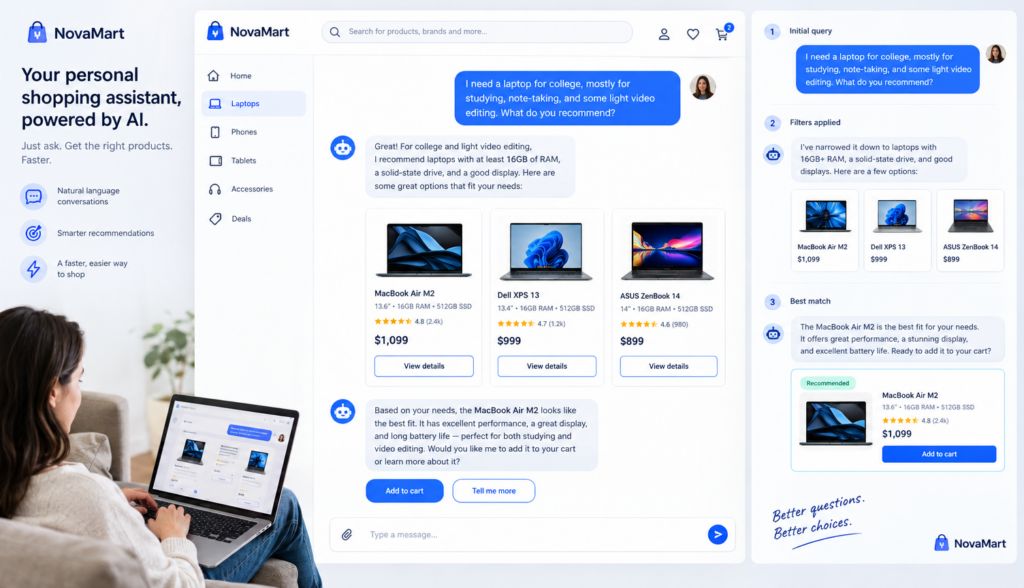
Most website visitors do not want to hunt through menus, filters, and pages to find what they need. They want to ask a question, get a useful answer, and take the next step. That is where an **AI search assistant** changes the role of website search. Instead of simply returning a list of links, it can understand what the visitor means, recommend relevant products or services, answer follow-up questions, and guide the person toward a purchase, appointment, quote request, lead form, or other conversion.
For many businesses, site search is still treated as a basic utility. It sits in the header, waits for someone to type a keyword, and then displays a results page. But visitors often search because they are ready to act. They may be comparing options, checking availability, looking for pricing, verifying compatibility, or trying to solve a specific problem. If your search experience is not helping them move forward, you may be losing qualified buyers at one of the most important moments in their journey.
An AI-powered search experience can turn that moment into a conversation.
## Why Traditional Site Search Falls Short
Traditional website search usually works by matching the words a visitor types with words found on your web pages, product descriptions, blog posts, or documents. If the exact words match, the visitor may get relevant results. If not, the experience can quickly become frustrating.
For example, a customer might search:
– “best laptop for graphic design”
– “do you have shoes for flat feet?”
– “can this software connect to QuickBooks?”
– “appointment for back pain”
– “replacement part for model X200”
A basic search tool may look for exact keywords such as “laptop,” “graphic,” “flat feet,” or “QuickBooks.” It may return a long list of pages, some useful and some not. The visitor is then responsible for clicking through results, scanning pages, and figuring out the answer.
That approach creates several problems:
– **It depends on exact wording.** If customers use different terms than your website does, they may not find what they need.
– **It returns pages, not answers.** Visitors may have to read several pages before they can make a decision.
– **It does not understand context.** A search for “small office printer” may involve budget, print volume, wireless setup, and supplies, but keyword search may not connect those needs.
– **It does not guide the next step.** Even when the right page appears, the search tool usually does not suggest a product, form, consultation, or checkout path.
– **It does not handle follow-up questions.** Visitors often have more than one question before they buy.
Traditional search is useful for navigation. But when a visitor has buying intent, support needs, or a complex question, basic search often stops short.
## What an AI Search Assistant Does Differently
An **AI search assistant** uses artificial intelligence to understand questions in more natural language. Instead of requiring visitors to type perfect keywords, it allows them to ask questions the way they would ask a salesperson, support representative, or consultant.
For example, instead of searching “men waterproof hiking boots size 11,” a shopper could ask:
> “What waterproof hiking boots do you recommend for long trails?”
The AI search assistant can interpret the intent behind the question. It understands that the visitor is likely looking for durable hiking boots, probably waterproof, suitable for longer use, and may need product recommendations rather than a generic search results page.
For a service business, a visitor might ask:
> “Do I need an appointment for a same-day AC repair?”
The assistant can answer based on the company’s approved website content, service information, location pages, and FAQs. It can then guide the visitor to schedule service, call the business, or complete a request form.
This is not the same as adding a generic chatbot that produces broad answers from the open internet. A business-focused AI assistant should work from the information you approve: your website content, product catalog, FAQs, documents, policies, pricing details, service descriptions, and other trusted sources. That keeps answers aligned with your business and reduces the risk of irrelevant or off-brand responses.
## Understanding Customer Intent, Not Just Keywords
The main advantage of AI-powered search is intent recognition. Intent is the reason behind the search.
Two people might search for the same product but have different needs:
– “running shoes” could mean shoes for beginners, marathon training, trail running, knee support, or a specific brand.
– “CRM software” could mean pricing, integrations, small business features, onboarding, or comparisons.
– “dentist near me” could mean emergency care, cosmetic dentistry, insurance acceptance, or appointment availability.
Traditional search focuses on the words. AI-assisted search can look at the full question and identify what the visitor is trying to accomplish.
This is where concepts such as **semantic search** and **natural-language search** matter.
Semantic search means the system looks for meaning, not just exact word matches. It can connect related terms and concepts. For example, it can understand that “sofa,” “couch,” and “sectional” may be related, or that “book a consultation” and “schedule an appointment” may point to the same action.
Natural-language search means visitors can type or say questions in everyday language. They do not need to know your product categories, internal terminology, or exact page titles. That makes search easier for new visitors who are unfamiliar with your site.
When search understands intent, it can provide a more useful response, such as:
– A direct answer to the question
– A short list of relevant products or services
– A comparison between options
– A link to a specific page, form, or booking tool
– A suggested next question
– A call to action based on the visitor’s goal
This turns search from a passive feature into an active part of the customer experience.
## Turning Product Search Into Product Recommendations
For ecommerce websites, an AI search assistant can act like a digital product guide. It can help shoppers narrow choices based on their needs instead of forcing them to browse every category and filter.
A customer might ask:
> “What’s a good office chair for lower back support under $300?”
A traditional search tool may return every page containing “office chair,” “back,” or “$300.” The shopper still has to compare options manually.
An AI search assistant can do more. Based on your product information, it may recommend chairs that match the price range and mention lumbar support, adjustability, ratings, or use cases if that information is available in your approved content. It can explain why certain products fit the request and provide links to view the items.
Other examples include:
– “Which skincare product is best for dry sensitive skin?”
– “What size generator do I need for a small food truck?”
– “Which plan is best for a team of 10?”
– “Do you sell pet-safe cleaning products?”
– “What replacement filter fits this model?”
In each case, the visitor is not just searching for a product name. They are looking for help making a decision.
AI-powered product recommendations can support that decision by using information such as:
– Product descriptions
– Specifications
– Categories and tags
– Size guides
– Compatibility details
– FAQs
– Buying guides
– Return and shipping policies
– Service or warranty information
The goal is not to pressure the shopper. The goal is to reduce confusion and help the customer choose confidently.
## Answering Follow-Up Questions Without Starting Over
Most buying journeys involve more than one question. A visitor may start with a broad search, then ask about price, fit, availability, setup, shipping, returns, or scheduling.
For example:
> “Which security camera is best for a small retail store?”
Then:
> “Does it work at night?”
Then:
> “Can I install it myself?”
Then:
> “How fast can it ship?”
With traditional search, each question becomes a separate search. The visitor may bounce between pages, open multiple tabs, and lose momentum.
An AI search assistant can keep the conversation going. It can understand that the follow-up question refers to the product or service already discussed. This creates a smoother experience, especially for visitors who are comparing options or trying to complete a task quickly.
Follow-up questions are especially valuable for:
– Ecommerce product selection
– B2B software research
– Healthcare and professional services
– Home services
– Education and training programs
– Financial or insurance products
– Membership organizations
– Technical support and documentation
When visitors can ask follow-up questions in one place, they are more likely to get the information they need before leaving the site.
## Using Approved Content With RAG
One common concern business owners have about AI is accuracy. They do not want a chatbot making up answers, quoting incorrect prices, or giving advice that is not based on company policies.
This is why an AI search assistant for a business website should be grounded in approved business content.
A common approach is called **RAG**, which stands for retrieval-augmented generation. The term sounds technical, but the idea is straightforward:
1. The visitor asks a question.
2. The system searches your approved content for relevant information.
3. The AI uses that information to generate a helpful answer.
4. The answer can include links to the source pages, products, or documents.
In simple terms, RAG helps the assistant answer from your business information rather than relying only on general AI knowledge.
For example, if a visitor asks about your return policy, the assistant can retrieve the actual return policy from your website or uploaded document and summarize it. If someone asks about a service area, it can refer to your approved location pages. If a shopper asks about product compatibility, it can use your product data or support documentation.
This makes the assistant more useful for real business situations because answers are tied to the content you control.
## Guiding Visitors Toward Clear Calls to Action
A strong website search experience should not only answer questions. It should help visitors take the next appropriate step.
That does not mean every response should push for a sale. The right call to action depends on the visitor’s intent.
If someone is comparing products, the next step might be:
– View recommended products
– Compare features
– Add to cart
– Read a buying guide
– Check availability
If someone is researching a service, the next step might be:
– Schedule an appointment
– Request a quote
– Call now
– Submit project details
– Choose a location
If someone is looking for support, the next step might be:
– Read a help article
– Start a return
– Download instructions
– Contact support
– Check order status
An AI search assistant can include these actions naturally in the conversation. For example:
> “Based on your question, the 12-month maintenance plan may be the best fit for a small office. You can view the plan details here, or schedule a consultation if you want help choosing between plans.”
This type of response is useful because it connects information with action. The visitor does not have to figure out where to go next.
## Converting Searches Into Sales
Search users often have stronger intent than casual browsers. They are actively telling you what they want. If your website can respond well at that moment, search can become a meaningful conversion channel.
To turn searches into sales, your site search should be able to:
– Understand conversational questions
– Identify purchase or lead intent
– Recommend relevant products, services, or content
– Answer objections and practical concerns
– Support follow-up questions
– Link to the right conversion path
– Use current, approved business information
Consider the difference between these two experiences.
A visitor searches:
> “Do you have catering for 30 people?”
A basic search tool returns a catering page, a menu PDF, and a blog post.
An AI search assistant can respond:
> “Yes, catering options are available for groups of 30. You can choose from boxed lunches, buffet-style meals, or custom packages. If you know your date and location, you can request a catering quote here.”
The second experience answers the question, summarizes the options, and points the visitor to the right action.
The same applies across many industries:
– A law firm can guide visitors to the right practice area and consultation form.
– A medical practice can answer service questions and direct patients to appointment scheduling.
– An ecommerce store can recommend products based on use case, size, budget, or compatibility.
– A SaaS company can explain plan differences and route leads to demos or trials.
– A home services company can qualify service requests and encourage booking.
The search box becomes more than a navigation tool. It becomes a sales and service assistant that works from the information already available on your website.
## What to Look for in an AI Search Assistant
Not all AI tools are designed for business website search. Some are general-purpose chatbots that can answer broad questions but are not connected deeply enough to your content, products, and conversion paths.
When evaluating an AI search assistant, look for capabilities such as:
– **Website content understanding:** It should read and use your pages, FAQs, and approved documents.
– **Product or service knowledge:** It should support your catalog, service descriptions, policies, and structured information.
– **Natural-language search:** Visitors should be able to ask complete questions, not just type keywords.
– **Semantic search:** The system should understand related terms and concepts.
– **Source grounding:** Answers should be based on your approved information whenever possible.
– **Follow-up support:** The assistant should maintain context throughout a conversation.
– **Conversion guidance:** Responses should include relevant links, forms, booking options, or product pages.
– **Business control:** You should be able to manage what information the assistant uses.
Chatbotbiz.ai is built for this type of use case: AI-powered chatbots and intelligent site search for business websites. Rather than acting like a general AI tool, it works with a company’s website content, product information, FAQs, documents, and other approved information so visitors can get natural-language answers that are relevant to that specific business.
## Preparing Your Website for Smarter Search
An AI search assistant works best when your website content is clear, accurate, and complete. Before adding intelligent search, it is helpful to review the information your visitors rely on most.
Start with these areas:
– Product and service pages
– Pricing or plan information
– FAQs
– Shipping, returns, and warranty policies
– Appointment or booking instructions
– Location and service area pages
– Buying guides
– Technical specifications
– Support documents
– Contact and lead forms
Look for gaps where customers often ask the same questions. If your staff repeatedly answers questions about sizing, compatibility, timelines, service areas, or pricing, your website should include that information in a clear format. The AI assistant can then use it to answer visitors more effectively.
Also think about your conversion paths. If the assistant recommends a product, where should it send the visitor? If someone is ready for a quote, which form should they complete? If they need urgent service, should they call or book online?
The better your content and pathways are organized, the more helpful your AI search experience can become.
## Conclusion: Make Search Part of the Sales Journey
Website search should do more than return a list of links. When visitors ask questions, they are often showing clear interest in a product, service, appointment, or solution. An **AI search assistant** helps your website respond in a more useful way by understanding intent, answering in natural language, recommending relevant options, supporting follow-up questions, and guiding people toward meaningful calls to action.
For businesses that rely on their website to generate sales, bookings, leads, or customer inquiries, intelligent site search can become an important part of the customer journey. It helps visitors find what they need faster and gives them a clearer path to act.
The result is a website that feels less like a static brochure and more like a helpful assistant—one that uses your approved business information to support better decisions and smoother conversions.